Getting AWS Inspector Findings to the People Who Own the Images
Table of Contents
The cyber team needs Amazon Inspector results for container images, and they have no access to the AWS console. Exporting the findings is the easy part. The problem I set out to solve is delivering them to the cyber team somewhere outside AWS, automatically, every week. I built a Terraform lab for the AWS half and designed the delivery half.
The problem: findings behind a console login #
Inspector is good at finding vulnerabilities in container images. The harder part is getting those findings to the people who review them. The cyber team has no access to the AWS console, so the findings exist but the team that needs them can’t open them. A report in an S3 bucket doesn’t fix that, because they can’t open the bucket either.
A one-off export would go stale within a day. What the team needed was current findings, delivered the same way every time, without anyone logging in to Inspector or AWS. The destination has to be outside AWS, in a place the cyber team already works.
The approach has two halves. First, AWS writes a findings report to an encrypted S3 bucket on a schedule. The bucket is a staging point and the cyber team never opens it. Second, an automated job outside AWS picks the report up and delivers it to the cyber team. This post covers the first half, which I built and tested in a public lab. The second half is what I am building next, so I describe the design and mark what I have not tested. You can deploy the lab into a personal AWS account and tear it down the same afternoon. The repo is at github.com/Nisha318/aws-inspector-container-scan-lab.
What I built #
Terraform deploys the infrastructure. A short script or a GitHub Actions workflow then pushes the container images, which mirrors how developers deliver images in a real pipeline.
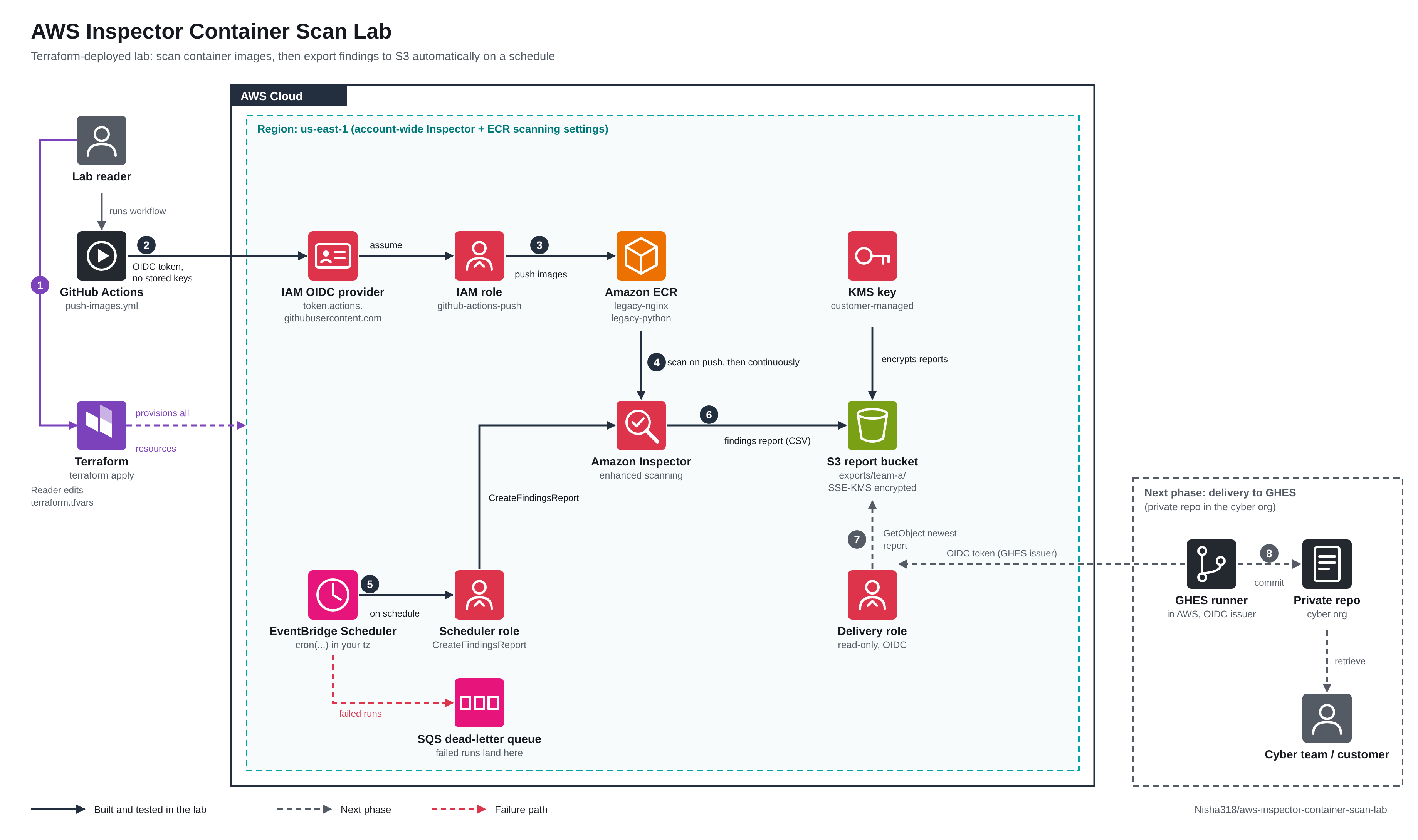
- Two private ECR repositories for the images
- Inspector enhanced scanning, scoped to the lab’s repositories so the rest of the account is untouched
- A customer-managed KMS key and an encrypted S3 bucket for the reports
- An optional IAM role that lets GitHub Actions push images with no stored access keys
- An optional EventBridge schedule that requests the report, with no Lambda function or custom code
- An optional SQS dead-letter queue that catches the error when a scheduled export fails after its retries
The images are nginx:1.21.6 and python:3.9.7-slim-bullseye. I picked them because they sit on Debian 11, which Inspector fully supports for ECR scanning, and because their older patch levels carry plenty of known CVEs. An image on a discontinued operating system only produces limited findings, which makes a weak demo.
Terraform does not push the images itself. Pushing is a build step, and keeping it separate means the lab shows the same flow a real team would follow.
Keyless pushes with GitHub OIDC #
The workflow option avoids stored AWS keys. The job asks GitHub for a signed token and sends it to AWS STS. If the role’s trust policy accepts the token, STS returns credentials that expire in about an hour.
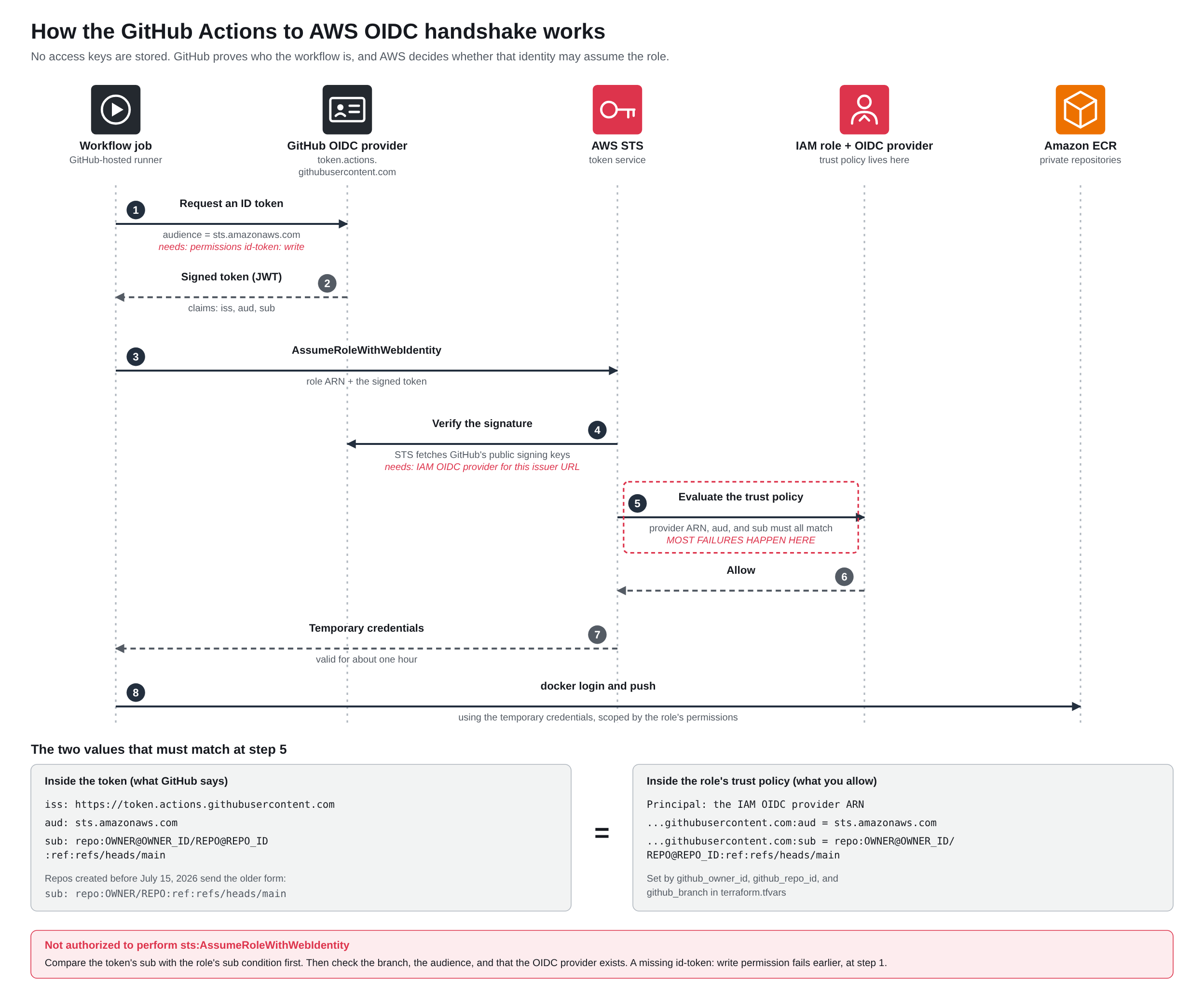
My first run failed with Not authorized to perform sts:AssumeRoleWithWebIdentity. The trust policy looked right. The audience, the repository, and the branch all matched, and the workflow had permissions: id-token: write.
So I looked at the token itself. A temporary debug step printed selected claims, never the whole token, since anyone who sees a token in a log can replay it until it expires. The sub claim did not match what I had written.
Repositories created after July 15, 2026 send a subject that includes immutable numeric IDs for the owner and the repo:
repo:OWNER@OWNER_ID/REPO@REPO_ID:ref:refs/heads/main
The older form was repo:OWNER/REPO:ref:refs/heads/main. A policy written for the old form never matches the new one.
GitHub made the change because names can be reused. If a repository is deleted or renamed and someone registers the same name, a policy that only matches names would trust the new owner. Numeric IDs stay the same through a rename and can’t be reused, so the policy keeps working for the right repo and fails for an impostor.
The fix in the lab is two variables, github_owner_id and github_repo_id. You can look up both values with one command:
gh api repos/OWNER/REPO --jq '{owner: .owner.id, repo: .id}'
The lesson I took from it applies to any OIDC failure. Compare both sides, what the token says against what the trust policy expects. Most failures are a mismatch between those two values.
Reading and triaging the findings #
A few minutes after the push, Inspector had scanned both images. Together they produced 566 active findings: 52 critical, 232 high, 249 medium, and 25 low. The nginx image carried 340 of them and the Python image carried 226.
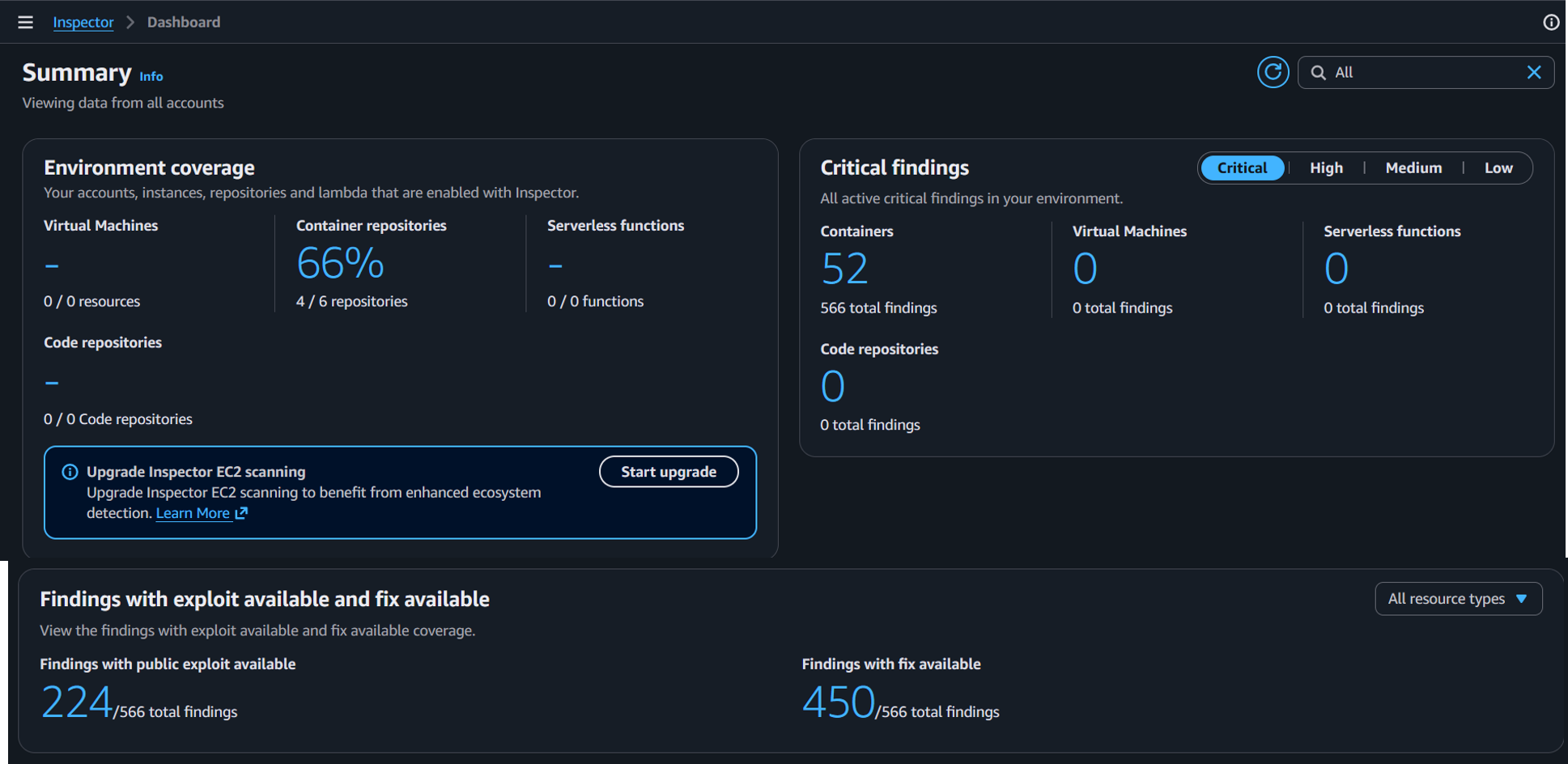
Two numbers on the dashboard matter more than the raw count. Of the 566 findings, 450 had a fix available, which is about 80 percent. For container images, the usual fix is to rebuild on a newer base image. And 224 had a public exploit. A critical finding with a public exploit and an available fix goes to the top of any list. A critical finding with no fix is a different decision, such as accepting the risk or adding a control around it.
A list of hundreds of findings is hard to work through, so I tried a suppression rule. I filtered to low severity, created a rule with that filter, and watched what happened. Inspector applies a rule in the background. The Active count for low findings dropped in steps, from 25 to 21 to 12 to 5 to 0. Switching the status filter to Suppressed showed the same 25. I recorded the whole step if you want to see it happen: watch the walkthrough.
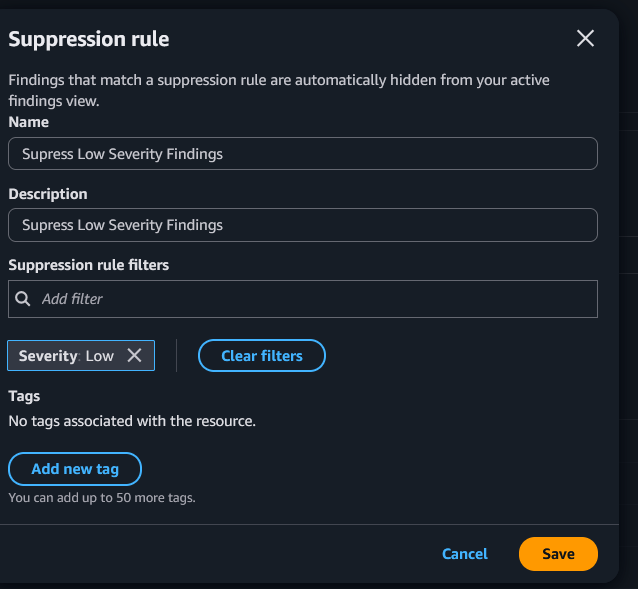
One console detail tripped me up. The findings table stops counting at 200 and shows 200+, so an unfiltered total can’t show a before and after. A severity filter keeps the count exact.
Suppressed does not mean fixed. The vulnerability is still there and the finding is only hidden, so a real suppression needs a recorded reason, an approver, and a date to review it. A broad rule like low severity also suits a demo better than production. In practice, a narrower rule such as no fix available is usually the more defensible choice.
There is one more effect to plan for. A report built from active findings leaves suppressed findings out, which includes the scheduled export described next. The team that reads the report should agree to what the rule hides.
Exporting the report to S3 on a schedule #
I started with a manual export from the console, so I could see what the file looks like before automating anything. The export screen asks for an S3 bucket and a KMS key. Inspector requires a customer-managed key. It cannot write a report with the AWS-managed S3 key, because the policy on that key can’t be edited. The key policy and the bucket policy both name the Inspector service as the writer, and I scoped each to my account and to Inspector report ARNs only.
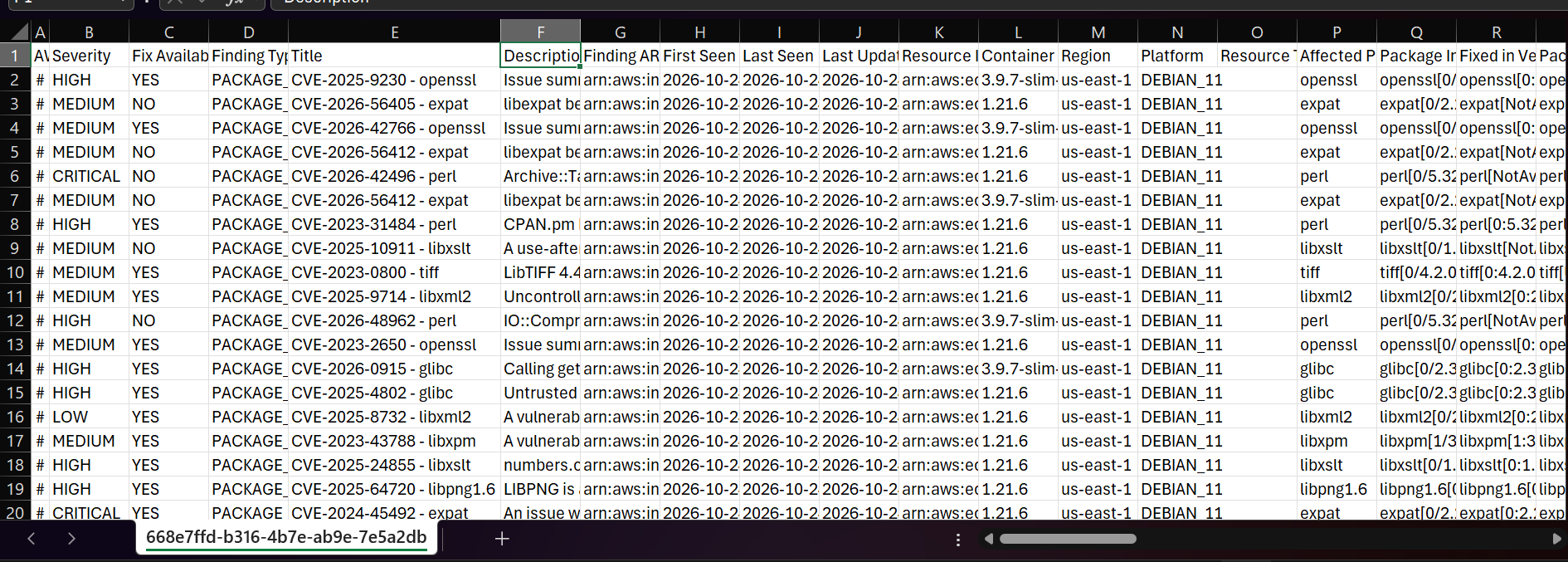
One spreadsheet note. Excel can mangle 12-digit account IDs in a CSV, turning them into scientific notation. Import the column as text.
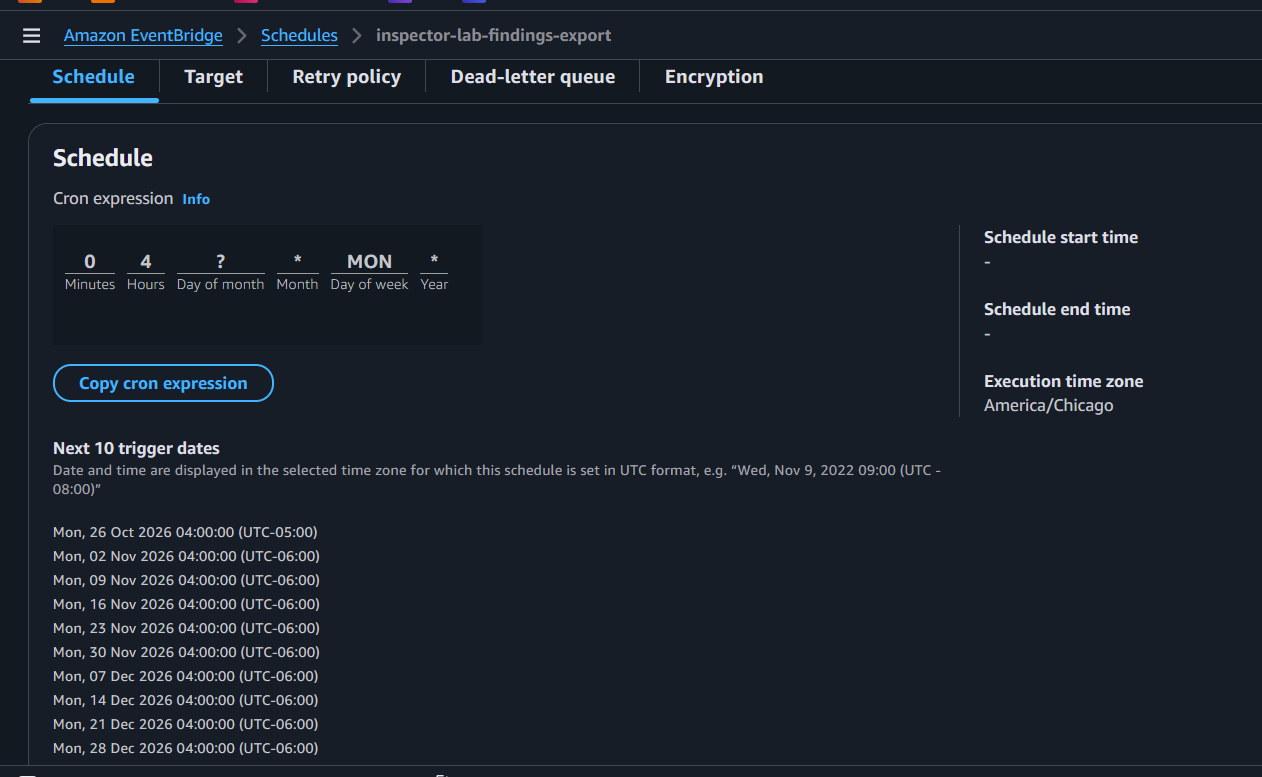
Then I automated it. EventBridge Scheduler can call the Inspector CreateFindingsReport API directly, so the schedule needs no Lambda function and no code. The schedule assumes a small role that can do one thing, request a findings report. It asks for active findings on the lab’s repositories and writes the file under a folder named for the customer. If a run fails, Scheduler drops the error into an SQS dead-letter queue, so a failure leaves a trace.
export_schedule          = "cron(0 4 ? * MON *)"
export_schedule_timezone = "America/Chicago"
export_customer          = "team-a"

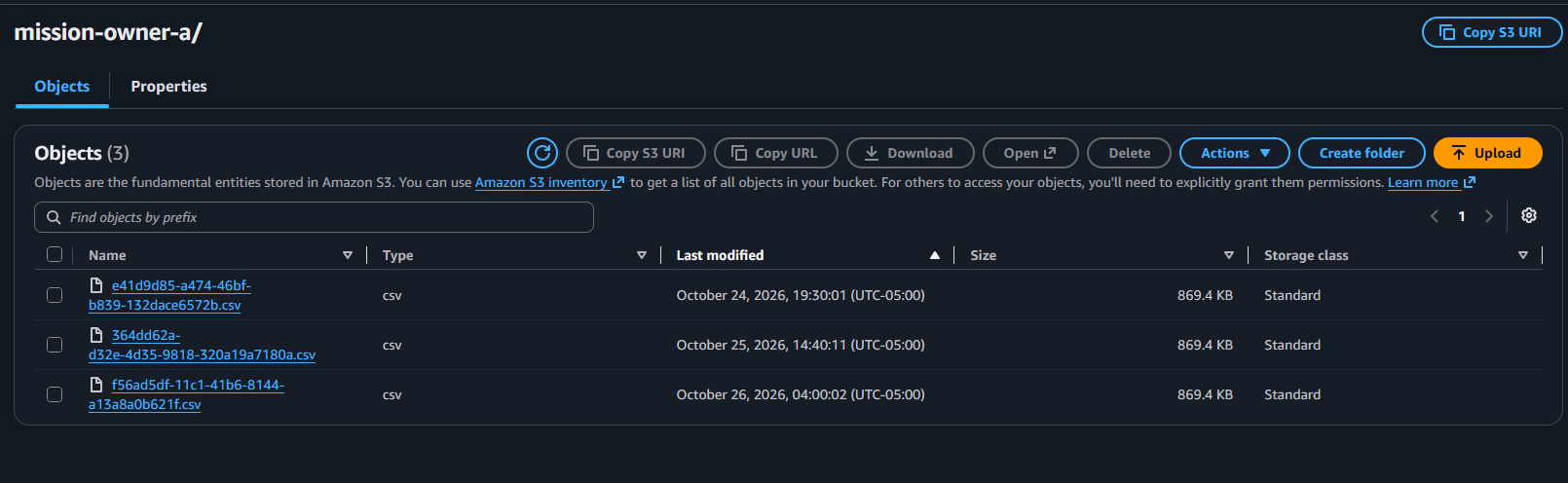
I tested it three times. A one-time schedule fired at 19:30:01, one second after the time I set, and a CSV of about 870 KB appeared in the bucket. The next day I changed it to a recurring cron expression a few minutes ahead and a second report arrived at 14:40:11. Then I set the weekly schedule, and the third report arrived at 04:00:02 on Monday, October 26, two seconds after the time I set. All three files matched in size, which told me the filter and the encryption behaved the same on every run.
For the team that needs the reports, the plan is a weekly run early on Monday morning, before business hours. Scheduler handles daylight saving shifts when you give it a time zone, so the report keeps arriving at the same local hour all year.
The second half: delivery outside AWS #
An S3 bucket solves the AWS side. It does nothing for someone who can’t open AWS, so a second job has to carry the report out. I looked at two directions. AWS could push the file to the other system, which means storing a credential for that system inside AWS. Or a job on the cyber team’s side could pull the file, which leaves AWS holding nothing. I chose pull.
The design has four parts:
- A scheduled workflow in the cyber team’s repository runs after the export finishes. If the export runs at 04:00 on Monday, the delivery job runs later that morning.
- The workflow authenticates to AWS with the same OIDC pattern from the lab, so no access keys are stored anywhere.
- It assumes a read-only role. The role can list and read the exports folder for one customer and decrypt with the report key. It can do nothing else.
- The workflow downloads the newest report and puts it where the team works, as a file in the repository or an attachment on the run.
Two conditions apply. AWS has to reach the GitHub server’s OIDC issuer address over the internet, with a certificate it trusts. And the cyber team has to agree that vulnerability data may be stored there.
The lab includes the AWS side of this, an IAM role that stays off unless you set a variable. I have not tested the delivery job end to end, so treat it as a design.
Results and what comes next #
The first half works. Images are scanned, findings are triaged, and a report lands in an encrypted bucket on a schedule with no one logging in to Inspector. It deploys with Terraform and comes down with terraform destroy. The second half, delivery outside AWS, is still ahead of me. I will write it up once it runs in a real environment.
Three things I would change before using this in production:
- Alert on failures. A weekly schedule means a failure can sit in the dead-letter queue for days. A CloudWatch alarm on the queue, sending to email or a team channel, turns that into a same-morning notice.
- Expire old reports. Each run adds a file. A lifecycle rule on the bucket keeps the folder from growing without limit.
- Settle the delivery rules with the cyber team. The report lists every vulnerable package in the images. Where it may be stored, who may open it, and how long it is kept are decisions for the security team, so I am taking them to that conversation before I build the delivery job.
I have not tested the lab in a GovCloud account yet. The Terraform builds its ARNs from the partition, so it should work there, but I will confirm that before I say so.
If you want to try it, the repo has the full walkthrough, the diagrams, and a cleanup section. Deploy it, push the images, and look at what Inspector finds. Then ask who else needs to see it.
The lab is on GitHub: Nisha318/aws-inspector-container-scan-lab.